TI XDS — Setup
The Setup options control the TI XDS interface.
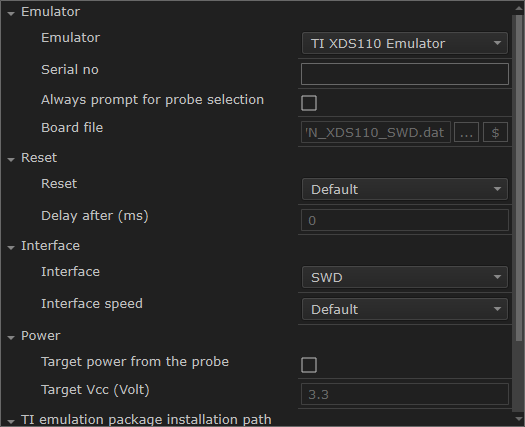
Emulator
Specify the emulator you are using. If more than one debug probe is connected to the host computer, use the Serial no option to select the correct one.
To force the Debug Probe Selection dialog box to be displayed each time you start a debug session, use the option Always prompt for probe selection.
To override the default board file, first select the menu command Specify custom board file in the Emulator drop-down menu and then specify a board file using the Board file option.
Reset
Selects the reset strategy to be used when the debugger starts. Based on your hardware, one of the strategies is the default. Choose between:
For Cortex-M devices:
- CPU reset
Resets the CPU.
- System reset
Resets the core and peripheral units.
- Board reset
Uses the reset pin to reset the device. Only available for CC26xx and CC13xx devices.
- Board reset + Run & Halt
Uses the reset pin to reset the device. Run and halt with delay. Available for all other Cortex-M devices.
- Device reset
Macro-based device-specific hardware reset.
For non-Cortex-M devices:
- Software reset
Sets
PCto the program entry address.
- Hardware reset
Uses the reset pin to reset the device.
- Device reset
Macro-based device-specific hardware reset.
Interface
Select the communication interface between the XDS debug probe and the target system.
Interface speed
Specifies the JTAG and SWD communication speed. Choose between:
- Default
Automatically uses the highest possible frequency for reliable operation.
- Adaptive
Synchronizes the clock to the processor clock outside the core. Works only with Arm devices that have the
RTCKJTAG signal available.
- n MHz
If there are JTAG communication problems or problems in writing to target memory (for example during program download), these problems might be resolved if the speed is set to a lower frequency.
Target power from the probe
Select to specify that the supply voltage to your target device will be supplied by the probe. Use Target Vcc to specify the voltage.
This option is only available for the stand-alone TI XDS110 debug probe.
TI emulation package installation path
Select Override default to override the default installation path of the Texas Instruments emulation package.