SFR Setup window
What do you want to do?
Learn about:
Learn how to:
Get reference information about the SFR Setup window, see below the line.

The SFR Setup window is available from the Debug menu.
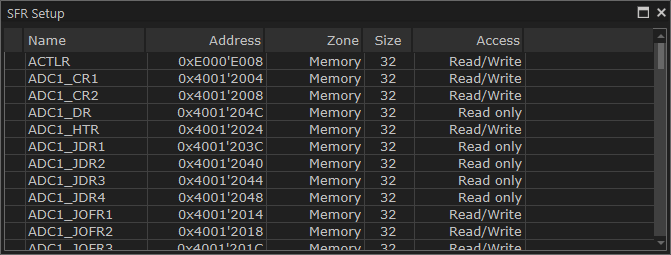
This window displays the currently defined SFRs that C-SPY has information about. You can choose to display only factory-defined or custom-defined SFRs, or both. If required, you can use the Edit SFR dialog box to customize the SFR definitions, see Edit SFR dialog box. For factory-defined SFRs (that is, retrieved from the ddf file in use), you can only customize the access type.
To quickly find an SFR, drag a text or hexadecimal number string and drop in this window. If what you drop starts with a 0 (zero), the Address column is searched, otherwise the Name column is searched.
Any custom-defined SFRs are added to a dedicated register group called Custom, which you can choose to display in the Registers window. Your custom-defined SFRs are saved in projectCustomSFR.sfr. This file is automatically loaded in the IDE when you start C-SPY with a project whose name matches the prefix of the filename of the sfr file.
You can only add or modify SFRs when the C-SPY debugger is not running.
Context menu
This context menu is available:
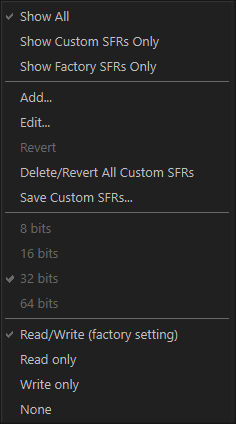
These commands are available:
- Show All
Shows all SFR.
- Show Custom SFRs only
Shows all custom-defined SFRs.
- Show Factory SFRs only
Shows all factory-defined SFRs retrieved from the ddf file.
- Add
Displays the Edit SFR dialog box where you can add a new SFR, see Edit SFR dialog box.
- Edit
Displays the Edit SFR dialog box where you can edit an SFR, see Edit SFR dialog box.
- Revert
Reverts a modified factory-defined SFR to its factory setting. Only available for factory-defined SFRs.
- Delete
Deletes a custom-defined SFR. Only available for custom-defined SFRs.
- Delete/Revert All Custom SFRs
Deletes all custom-defined SFRs and reverts all modified predefined SFRs to their factory settings.
- Save Custom SFRs
Opens a standard Save dialog box to save all custom-defined SFRs.
- 8|16|32|64 bits
Selects display format for the selected SFR, which can be 8, 16, 32, or 64 bits. Note that the display format can only be changed for custom-defined SFRs.
- Read/Write|Read only|Write only|None
Selects the access type of the selected SFR, which can be Read/Write, Read only, Write only, or None. Note that for factory-defined SFRs, the default access type is indicated.