C-STAT Tools Options
To open the C-STAT Tools Options page, choose Project>Options and select the Static Analysis category.
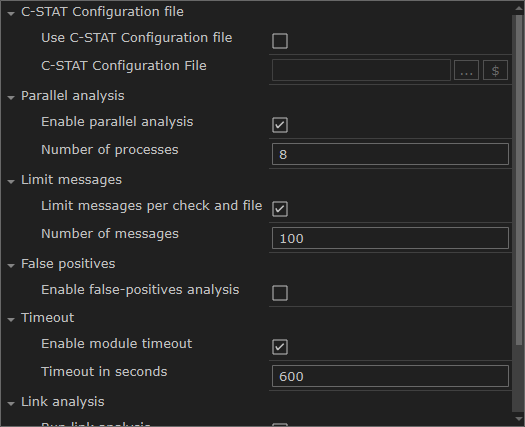
Use this page to specify options for performing a static analysis using C-STAT.
- Use C-STAT configuration file
Uses a C-STAT configuration file for the C-STAT analysis, overriding any previously specified options in the project. Specify the file in the text box. A browse button is available for your convenience.
- Enable parallel analysis
Enables C-STAT to perform analysis in parallel.
- Enable module timeout
Specify the number of seconds after which the analysis terminates.
- Enable false-positives analysis
Attempts to remove false messages, commonly referred to as false positives.
- Limit messages per check and file
Specify the maximum number of messages to be produced per check and file.
- Run link analysis
Checks the content of all object files (
.o) files together to try to find problems.- Output directory
Overrides the default directory for storing all information generated by C-STAT. Type the name of the directory where you want to store the information for the project. To delete the C-STAT database file, choose Project>C-STAT Static Analysis>Clear Analysis Results.
注記
This option is not available in all versions of IAR Embedded Workbench.