ウィンドウメニュー
ウィンドウメニューには、 IDEウィンドウを操作し、画面上の配置を変更するためのコマンドが用意されています。
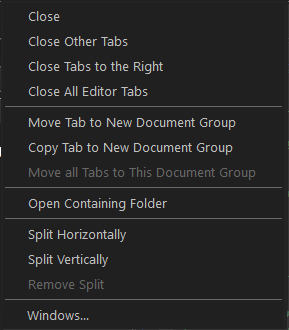
ウィンドウメニューの最後のセクションには、現在開いているウィンドウのリストが表示されます。リストから切り替えるウィンドウを選択します。
メニュー コマンド
以下のコマンドを使用できます。
- Close
アクティブなエディタドキュメントを閉じます。
- Close Other Tabs
Closes all open editor documents except for the active document.
- Close Tabs to the RIght
Closes all open editor documents to the right of the active document in the editor window.
- Close All Editor Tabs
Closes all open editor documents.
- Move Tab to New Editor Group
Opens a new empty window next to the active editor window and moves the active document to the new window.
- Copy Tab to New Editor Group
Opens a new empty window next to the active editor window and displays the active editor document in the new window as well.
- タブを新規エディタウィンドウとして横に並べる
現在のエディタウィンドウの下に新しい空のウィンドウを開き、アクティブなドキュメントを新しいウィンドウに移動します。
- Open Containing Folder
Opens the location of the active editor document in a file explorer window.
- Split Horizontally
Splits an editor document view horizontally into two panes, which means that you can see two parts of a file simultaneously.
- Split Vertically
Splits an editor document view vertically into two panes, which means that you can see two parts of a file simultaneously.
- Remove Split
Removes the second pane of a split editor document view.