- IAR Embedded Workbench for Arm 9.70.x
- C-SPY Debugging
- Breakpoints
- Reference information on breakpoints
- Code breakpoints dialog box
Code breakpoints dialog box
What do you want to do?
Learn about:
Learn how to:
Get reference information about the Code breakpoints dialog box, see below the line.

The Code breakpoints dialog box is available from the context menu in the editor window, Breakpoints window, and in the Disassembly window.
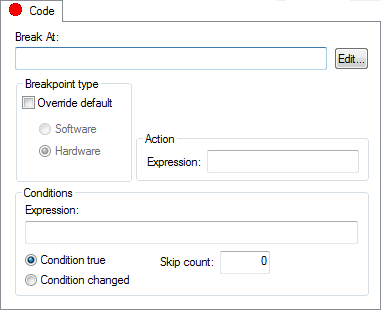
This figure reflects the C-SPY simulator.
Use the Code breakpoints dialog box to set a code breakpoint, see Setting breakpoints using the dialog box.
Requirements
Can be used with all C-SPY debugger drivers and debug probes.
Break At
Specify the code location of the breakpoint in the text box. Alternatively, click the Edit button to open the Enter Location dialog box, see Enter Location dialog box.
Breakpoint type
Overrides the default breakpoint type. Select the Override default checkbox and choose between the Software and Hardware options.
You can specify the breakpoint type for these C-SPY drivers:
The C-SPY I-jet driver
The C-SPY CMSIS-DAP driver
The C-SPY GDB Server driver
The C-SPY J-Link/J-Trace driver
The C-SPY TI MSP-FET driver
The C-SPY TI XDS driver
Size
Determines whether there should be a size—in practice, a range—of locations where the breakpoint will trigger. Each fetch access to the specified memory range will trigger the breakpoint. Select how to specify the size:
- Auto
The size will be set automatically, typically to 1.
- Manual
Specify the size of the breakpoint range in the text box.
Note
This option might not be supported by the combination of C-SPY driver and device that you are using.
Action
Specify a valid C-SPY expression, which is evaluated when the breakpoint is triggered and the condition is true. For more information, see Useful breakpoint hints.
Conditions
Specify simple or complex conditions:
- Expression
Specify a valid C-SPY expression, see C-SPY expressions.
- Condition true
The breakpoint is triggered if the value of the expression is true.
- Condition changed
The breakpoint is triggered if the value of the expression has changed since it was last evaluated.
- Skip count
The number of times that the breakpoint condition must be fulfilled before the breakpoint starts triggering. After that, the breakpoint will trigger every time the condition is fulfilled.