Getting started using C-RUN runtime error checking
Typical use of C-RUN involves these steps:
Determine which C-RUN checks that are needed and specify them in the C-RUN options.
Run your application in the IAR Embedded Workbench IDE and interactively inspect each C-RUN message. For each message, determine if it is the result of a real problem or not. If not, you can apply a rule to ignore that particular message, or similar messages in the future. If the message is the result of a real problem, you might, depending on the particular circumstances, need to correct the problem and rerun, or you might check for other problems first.
When finished, close C-SPY. Because the C-RUN windows stay open, now is the time to work through the found problems. Look at the rules setup, possibly edit it, and then save it for future runs.
Repeat the process until all problems are taken care of.
More in detail, to perform runtime error checking and detect possible runtime errors, follow this example of a typical process:
To set project options for runtime checking, choose Project>Options>Runtime Checking and select the runtime checks you want to perform, for example Bounds checking.
Note that runtime checking must be enabled on the project level, then you must enable each type of check you want to use. Some of the check options, such as Use checked heap, and Enable bounds checking, must be enabled on the project level, whereas others can be enabled on project or file level.
Build your application. Note that the lower optimization levels give you better information.
Start a debug session.
Start executing your application program.
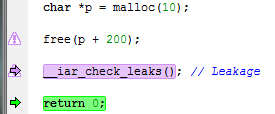
If C-RUN detects a possible error, the program execution stops and the corresponding source code is highlighted in the editor window:
The C-RUN Messages window is displayed if it is not already open, and it provides information about the source code construct, type of check, and the call stack information for the source location
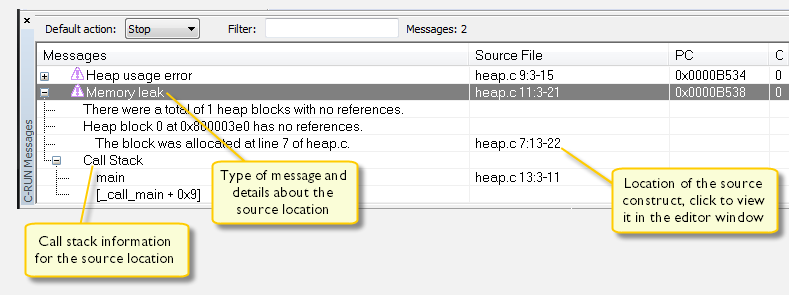
Note that detection of a problem might not occur at the actual point of access. The check might have been moved out of a loop, or several checks for different accesses might have been merged. In these cases, the problem source (the source for the problem access) might not be in the current statement, and there might be more than one problem source.
Depending on the source code construct, you might be able to continue program execution after the possible error has been detected. Note that some types of errors might cause unexpected behavior during runtime because of, for example, overwritten data or code.
If required, use the C-RUN Messages Rules window to specify rules to filter out specific messages based on specific checks and source code locations, specific checks and source files, or specific checks only. You can also specify whether a specific check should not stop the execution, but only log instead. See Creating rules for messages.
You can repeat this procedure for the various runtime checks you want to perform.