CMSIS-DAP — Setup
The Setup options control the C-SPY CMSIS-DAP driver.
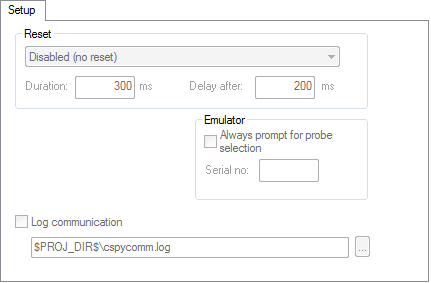
Reset
Selects the reset strategy to be used when the debugger starts. Note that the Reset option is only applicable for Cortex-M devices. Based on your hardware, one of the strategies is the default. Choose between:
- Disabled (no reset)
No reset is performed.
- Software
Sets
PCto the program entry address. This is a software reset.
- Hardware
The probe toggles the
nSRST/nRESETline on the JTAG connector to reset the device. This reset usually also resets the peripheral units. The reset pulse timing is controlled by the Duration and Delay after options.The processor should stop at the reset handler before executing any instruction. Some processors might not stop at the reset vector, but will be halted soon after, executing some instructions.
- Core
Resets the core via the
VECTRESETbit—the peripheral units are not affected.
- System
Resets the core and peripherals. This is the default reset strategy.
- Connect during reset
CMSIS-DAP connects to the target while keeping Reset active. Reset is pulled low and remains low while connecting to the target.
- Custom
Device-specific hardware reset. Some devices might require a special reset procedure or timing to enable debugging, or to bring the processor to a halt before it has executed any instruction.
A watchdog timer might be disabled.
Special debug modes, such as debugging in power-saving modes, might be turned on.
This option is only available for some devices.
- Reset by watchdog or reset register
Resets the processor using a software reset register or a watchdog reset. Peripheral units might not be reset.
This reset strategy is recommended when the processor cannot be stopped at the reset vector using the hardware reset.
Device-specific software reset. This option is only available for some devices.
- Reset and halt after bootloader
Some devices have a ROM bootloader that executes before the processor jumps to your application code. Use this reset strategy to let the bootloader code execute and to halt the processor at the entry of the application code.
Depending on the device, this reset strategy is implemented using the hardware, core, or system reset.
This option is only available for some devices.
- Reset and halt before bootloader
This reset strategy is complementary to the Reset and halt after bootloader strategy. Depending on the device, it is implemented using the hardware, core, or system reset.
This option is only available for some devices.
All of these strategies are available for both the JTAG and the SWD interface, and all strategies halt the CPU after the reset.
A software reset of the target does not change the settings of the target system—it only resets the program counter.
Normally, a C-SPY reset is a software reset only. If you use the Hardware option, C-SPY will generate an initial hardware reset when the debugger is started. This is performed once before download, and if the option Use flash loader(s) is selected, also once after flash download. See Debugging code in flash, and Debugging code in RAM.
Tip
Hardware resets can be a problem if the low-level setup of your application is not complete. If the low-level setup does not set up memory configuration and clocks, the application will not work after a hardware reset. To handle this in C-SPY, the setup macro function execUserReset() is suitable. For a similar example where execUserPreload() is used, see Remapping memory.
Duration
The time in milliseconds that the hardware reset asserts the reset signal (line nSRST/nRESET) low to reset the device.
Some devices might require a longer reset signal than the default 200 ms.
This option applies to the hardware reset, and to those custom reset strategies that use the hardware reset.
Delay after
The delay time, in milliseconds, after the reset signal has been de-asserted, before the debugger attempts to control the processor.
The processor might be kept internally in reset for some time after the external reset signal has been de-asserted, and thus inaccessible for the debugger.
This option applies to the hardware reset, and to those custom reset styles that use the hardware reset.
Note
User-defined millisecond timeouts and delays are generated using the host operating system clock ticks. Because the host operating system is not a real-time OS, the actual delay or timeout will vary each time with approximately 5–20 ms.
Emulator
These options are used for identifying the debug probe to use.
- Always prompt for probe selection
Makes C-SPY always ask you to confirm which probe to use, if more than one debug probe is connected to the host computer.
- Serial no
Enter the serial number of the debug probe you are using.
Log communication
Logs the communication between C-SPY and the target system to a file. To interpret the result, detailed knowledge of the interface is required.