- IAR Embedded Workbench for Arm 9.70.x
- C-SPY Debugging
- Interrupts
- Reference information on interrupts
- Interrupt Configuration window
Interrupt Configuration window
What do you want to do?
Learn about:
Learn how to:
Get related information:
Get reference information about the Interrupt Configuration window, see below the line.

The Interrupt Configuration window is available by choosing Simulator>Interrupt Configuration.
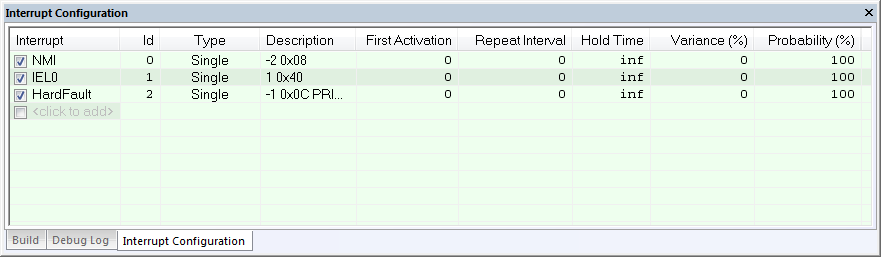
This window lists all installed interrupts. Use this window to enable or disable individual interrupts or the interrupt simulation system, and to edit the properties of installed interrupts.
Requirements
The C-SPY simulator. Not available for all cores and devices.
Display area
This area contains these columns:
- Interrupt
Lists all installed interrupts. Use the checkbox to enable or disable the interrupt.
- ID
A unique interrupt identifier.
- Type
Shows the type of the interrupt. The type can be one of:
Forced, a single-occasion interrupt defined in the Available Interrupts window.
Single, a single-occasion interrupt.
Repeat, a periodically occurring interrupt.
If the interrupt has been set from a C-SPY macro, the additional part (macro) is added, for example: Repeat(macro).
- Description
A description of the selected interrupt, if available. The description is retrieved from the selected device description file and consists of a string describing the priority, vector offset, enable bit, and pending bit, separated by space characters. The enable bit and pending bit are optional. It is possible to have none, only the enable bit, or both. For interrupts specified using the system macro
__orderInterrupt, the Description box is empty.For Cortex-M devices, the description is retrieved from the selected device description file and is editable. Enable bit and pending bit are not available from the ddf file—they must be manually edited if wanted. The priority is as in the hardware—the lower the number, the higher the priority. NMI and HardFault are special, and their descriptions should not be edited. Cortex-M interrupts are also affected by the
PRIMASK,FAULTMASK, andBASEPRIregisters, as described in the Arm documentation.For other devices, the description strings for IRQ and FIQ are hardcoded and cannot be edited. In those descriptions, a higher priority number means a higher priority.
- Variance %
A timing variation range, as a percentage of the repeat interval, in which the interrupt might occur for a period. For example, if the repeat interval is 100 and the variance 5%, the interrupt might occur anywhere between T=95 and T=105, to simulate a variation in the timing. Click to edit.
Context menu
This context menu is available:
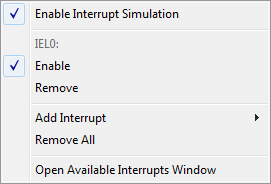
These commands are available:
- Enable Interrupt Simulation
Enables or disables the entire interrupt simulation system. If the interrupt simulation is disabled, the definitions remain but no interrupts are generated. Note that you can also enable and disable installed interrupts individually by using the check box to the left of the interrupt name in the list of installed interrupts.
- Enable
Enables or disables the individual interrupt you clicked on.
- Remove
Removes the individual interrupt you clicked on.
- Add Interrupt
Selects an interrupt to install. The drop-down list contains all available interrupts. Your selection will automatically update the Description box. The list is, for Cortex-M devices, populated with entries from the device description file that you have selected. For other devices, only two interrupts are available: IRQ and FIQ.
- Remove All
Removes all installed interrupts in the window.
- Open Available Interrupts Window
Opens the Available Interrupts window, see Available Interrupts window.