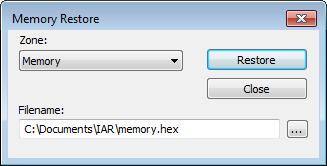
IAR Embedded Workbench for Arm 9.70.xC-SPY DebuggingMemory and registersReference information on memory and registersMemory Restore dialog boxMemory Restore dialog boxIn this section: What do you want to do?Learn about:Briefly about monitoring memory and registersC-SPY memory zonesGet related information:Memory Save dialog boxGet reference information about the Memory Restore dialog box, see below the line.The Memory Restore dialog box is available by choosing Debug>Memory>Restore or from the context menu in the Memory window.Use this dialog box to load the contents of a file in Intel-extended or Motorola S-record format to a specified memory zone.RequirementsCan be used with all C-SPY debugger drivers and debug probes.ZoneSelects a memory zone, see C-SPY memory zones.FilenameSpecify the file to be read. A browse button is available.RestoreLoads the contents of the specified file to the selected memory zone.