- IAR Embedded Workbench for Arm 9.70.x
- C-SPY Debugging
- Trace
- Reference information on trace
- Trace Stop breakpoints dialog box (J-Link/J-Trace)
Trace Stop breakpoints dialog box (J-Link/J-Trace)
The Trace Stop dialog box is available from the context menu that appears when you right-click in the Breakpoints window. You can also right-click in the editor window or the Disassembly window, and then choose Toggle Breakpoint (Trace Stop).
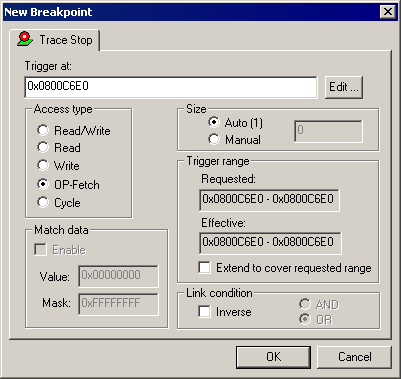
When the trace condition is triggered, the trace data collection is performed for some further instructions, and then the collection is stopped.
Requirements
The C-SPY J-Link/J-Trace driver.
Trigger at
Specify the stopping point of the code section for which you want to collect trace data. You can specify a variable name, an address, or a cycle counter value.
Size
Controls the size of the address range, that when reached, will trigger the stop of the trace data collection. Choose between:
- Auto
Sets the size automatically. This can be useful if Trigger at contains a variable.
- Manual
Specify the size of the breakpoint range manually.
Trigger range
Shows the requested range and the effective range to be covered by the trace data collection. The range suggested is either within or exactly the area specified by the Trigger at and the Size options.
- Extend to cover requested range
Extends the range so that a whole data structure is covered. For data structures that do not fit the size of the possible ranges supplied by the hardware breakpoint unit, for example three bytes, the range will not cover the whole data structure. Note that the range will be extended beyond the size of the data structure, which might cause false triggers at adjacent data.
This option is not enabled for Arm7/9 devices because the range for such devices will always cover the whole data structure.
Access Type
Selects the type of memory access that triggers the breakpoint:
- Read/Write
Reads from or writes to location.
- Read
Reads from location.
- Write
Writes to location.
- OP-fetch
Accesses at execution address.
- Cycle
The number of counter cycles at a specific point in time, counted from where the execution started. This option is only available for Cortex-M devices.
Any accesses of the specified type will stop the trace data collection.
Match data
Enables matching of the accessed data. Use the Match data options in combination with the Read/Write, Read, or Write access types for data. This option can be useful when you want a trigger when a variable has a certain value.
The Match data options are only available for J-Link/J-Trace and when using a Cortex-M device.
Note
For Cortex-M devices, only one breakpoint with Match data can be set. Such a breakpoint uses two breakpoint resources.
Link condition
Specifies how trace conditions are combined, using AND and OR. When combining a condition that has the link condition AND with a condition that has the link condition OR, AND has precedence. The option Inverse inverts the trace condition and is individual for each trace filter condition. If one trace start or stop condition is inverted, all others will be too. An inverted trace start or stop condition means that the trace data collection is performed everywhere except for this section of the application code.
For Arm7/9 devices, trace filters are combined using the OR algorithm. Use the Inverse option to invert the trace filter—all trace filters are affected. The trace filter will be combined with the start and stop triggers, if any, using the AND algorithm.