32-bit
The 32-bit options specify target-specific features for the IAR C/C++ Compiler and Assembler in 32-bit mode.
If a 64-bit device is used in 32-bit mode, it is the 64-bit page that decides the FPU behavior, not the 32-bit page.
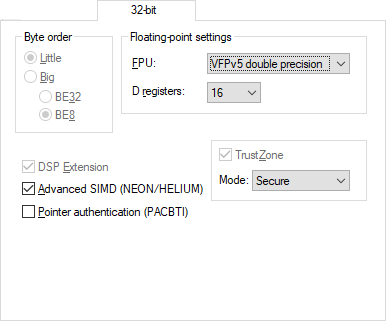
Byte order
Selects the byte order for your project:
- Little
The lowest byte is stored at the lowest address in memory. The highest byte is the most significant—it is stored at the highest address.
- Big
The lowest address holds the most significant byte, while the highest address holds the least significant byte.Choose between two variants of the big-endian mode:
BE32 to make both data and code big-endian
BE8 to make data big-endian and code little-endian
FPU
Select the floating-point unit:
- None (default)
The software floating-point library is used.
- VFPv2
A VFP unit that conforms to architecture VFPv2.
- VFPv3
A VFP unit that conforms to architecture VFPv3.
- VFPv4
A VFP unit that conforms to architecture VFPv4.
- VFPv4 single-precision
A VFP unit that conforms to the VFPv4 architecture, single-precision.
- VFPv5 single-precision
A VFP unit that conforms to the VFPv5 architecture, single-precision.
- VFPv5 double-precision
A VFP unit that conforms to the VFPv5 architecture, double-precision.
- VFP9-S
A VFPv2 architecture that can be used with the ARM9E family of CPU cores. Selecting this coprocessor is therefore identical to selecting the VFPv2 architecture.
By selecting a VFP coprocessor, you will override the use of the software floating-point library for all supported floating-point operations.
D registers
Selects the number of D registers to be used by the compiler.
DSP Extension
Select this option to make the compiler use DSP instructions, if available on your device.
Advanced SIMD (NEON/HELIUM)
Selects the Neon or Helium architecture for your project, if it is available for your device.
Pointer Authentication (PACBTI)
This option is selected when you have selected a device or core with support for the Pointer Authentication and Branch Target Identification (PABCTI) extension. Deselect it if you do not want to use Pointer Authentication or Branch Target Identification.
TrustZone
Enables TrustZone for your project, if it is available for your device.
If you have set the option Core to either Cortex-M23 or Cortex-M33, the option TrustZone is automatically selected. If your device does not have TrustZone, deselect the option TrustZone.
For other cores, this option is automatically deselected, unless your device has TrustZone or if you have selected a core that always has TrustZone.
When the option TrustZone is selected, the compiler and assembler options ‑‑cmse can be used.
For more information about TrustZone, see Arm TrustZone®. the .
Mode
Specifies whether the current project is for secure or non-secure mode.
This option is automatically selected if the option TrustZone is selected.
- Secure
Indicates that your project will be built for secure mode.
When you have selected the secure mode, the compiler and assembler options
‑‑cmseare automatically set.
- Non-secure
Indicates that your project will be built for non-secure mode.