Output
The Output options determine the type of output file. You can also specify the destination directories for executable files, object files, list files, and build files.
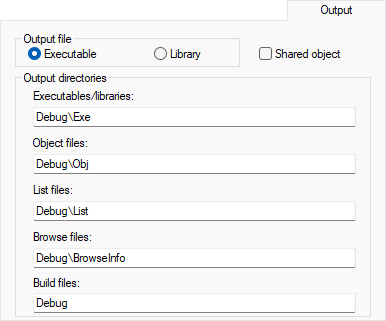
Output file
Selects the type of the output file. Choose between:
- Executable (default)
As a result of the build process, the linker will create an application (an executable output file). When this setting is used, linker options will be available in the Options dialog box. Before you create the output you should set the appropriate linker options.
- Library
As a result of the build process, the library builder will create a library file. When this setting is used, library builder options will be available in the Options dialog box, and Linker will disappear from the list of categories. Before you create the library you can set the options.
Shared object
Select this option to generate a shared object output file instead of an executable output file. Using this option changes the filename extension from .out to .so. Note that the option is only available in 32-bit mode. For more information about shared objects, see Shared objects (32-bit mode only).
Output directories
Specify the paths to the destination directories. Note that incomplete paths are relative to your project directory. You can specify:
- Executables/libraries
Overrides the default directory for executable or library files. Type the name of the directory where you want to save executable files for the project.
- Object files
Overrides the default directory for object files. Type the name of the directory where you want to save object files for the project.
- List files
Overrides the default directory for list files. Type the name of the directory where you want to save list files for the project.
- Browse files
Overrides the default directory for storing source browser information. Type the name of the directory where you want to store source browser information for the project. To delete the contents of this directory, choose Project>Clean Browse Information.
- Build files
Overrides the default directory for build files, that is, logs, dependency files, and other files generated by the build engine. Type the name of the directory where you want to save build files for the project.
Note that sharing a build file directory between multiple build configurations can increase the number of rebuilds (as the configurations might use different command lines).