CMake/CMSIS-Toolbox options
The IDE Options dialog box contains a page for using IAR Embedded Workbench with CMake/CMSIS-Toolbox. The page is available by choosing Tools>Options>CMake/CMSIS-Toolbox.
The /CMSIS-Toolbox options are available by choosing Tools>Options.
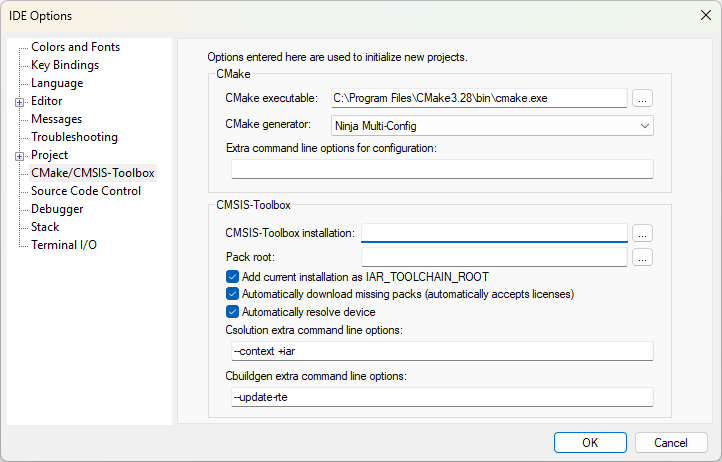
These options will be used when you create new CMake/CMSIS-Toolbox projects. Any settings made in the project options dialog box—available by choosing Project>Options>CMake/CMSIS-Toolbox—will override these options.
CMake executable
Specifies the path to the CMake installation.
CMake generator
Sets the build generator. Choose between:
Ninja
Ninja Multi-Config
Extra command line options for configuration
Use this field to send command line build options directly to CMake.
CMSIS-Toolbox installation
Specifies the path to the CMSIS-Toolbox installation.
Pack root
Specifies the location of the pack root folder (the local PACK repository).
Add current installation as IAR_TOOLCHAIN_ROOT
Sets the IAR_TOOLCHAIN_ROOT environment variable to the path of the CMSIS-Toolbox installation, for the instance of IAR Embedded Workbench you are currently using.
Automatically download missing packs (automatically accepts licenses)
Select this option to make IAR Embedded Workbench automatically attempt to locate and download missing packs.
Note
Packs will be installed regardless of the type of license that governs their use.
Automatically resolve device
Select this option to set the device automatically, based on the information in the csolution.yml project file. This will change the device setting on the project options Target page (Project>Options>General Options>Target).
Csolution extra command line options
Use this field to send command line options directly to csolution, the CMSIS-Toolbox Project Manager.
Cbuildgen extra command line options
Use this field to send command line build options directly to the cbuildgen tool.