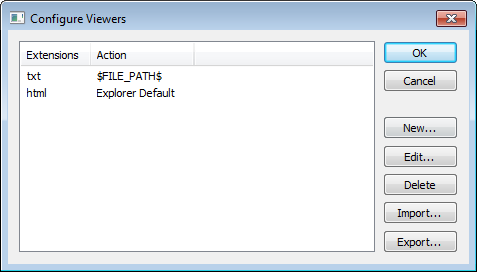
The Configure Viewers dialog box is available from the Tools menu.
This dialog box lists overrides to the default associations between the document formats that IAR Embedded Workbench can handle and viewer applications.
Display area
This area contains these columns:
Extensions
Explicitly defined filename extensions of document formats that IAR Embedded Workbench can handle.
Action
The viewer application that is used for opening the document type. Explorer Default means that the default application associated with the specified type in Windows Explorer is used.
Removes the association between the selected filename extensions and the viewer application.
Import
Opens a file browser where you can locate and import a File Viewer Association file in XML format. This file contains associations between document formats and viewer applications. The XML structure of this file is described in the example file FileViewerAssociationsExample.xml located in the arm\src\ide\ directory in your product installation.
Export
Displays a standard Save As dialog box to let you save the current associations between document formats and viewer applications in the Configure Viewers dialog box to a file in XML format.