Get reference information about the Edit SFR dialog box, see below the line.

The Edit SFR dialog box is available from the context menu in the SFR Setup window.
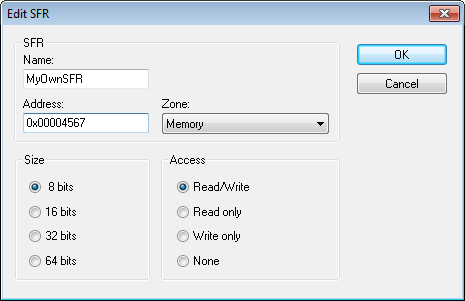
Definitions of the SFRs are retrieved from the device description file in use. Use this dialog box to either modify these factory-defined definitions or define new SFRs.
Requirements
Can be used with all C-SPY debugger drivers and debug probes.
Name
Specify the name of the SFR that you want to add or edit.
Address
Specify the address of the SFR that you want to add or edit. The hexadecimal 0x prefix for the address can be omitted, the value you enter will still be interpreted as hexadecimal. For example, if you enter 4567, you will get 0x4567.
Zone
Selects the memory zone for the SFR you want to add or edit. The list of zones is retrieved from the ddf file that is currently used.
Size
Selects the size of the SFR. Choose between 8, 16, 32, or 64 bits. Note that the display format can only be changed for custom-defined SFRs.
Access
Selects the access type of the SFR. Choose between Read/Write, Read only, Write only, or None. Note that for factory-defined SFRs, the default access type is indicated.