Setup
What do you want to do?
Learn how to:
Get related information:
Get reference information about the Setup page; see below the line.

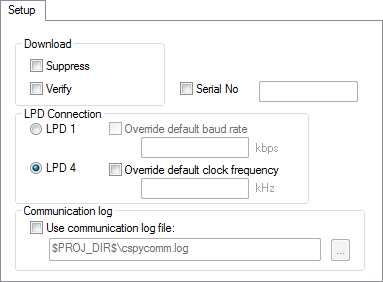
The Setup options control the E1/E2/E20 Emulator.
Suppress
Disables the downloading of code, while preserving the present content of the flash. This command is useful if you want to debug an application that already resides in target memory.
If this option is combined with the Verify option, the debugger will read back the code image from non-volatile memory and verify that it is identical to the built application.
Verify
Verifies that the downloaded code image can be read back from target memory with the correct contents.
Serial No
Selects which Renesas emulator to use, if more than one is connected to your host computer via USB.
LPD connection
Controls how the emulator connects to the target board. Choose between:
- LPD 1
The emulator connects to the target board via the 1-pin debug interface. The communication speed is determined by the hardware and can be inspected in the Debug Log window. To change the communication speed, select the Override default baud rate option and specify a new value.
- LPD 4
The emulator connects to the target board via the 4-pin debug interface. The clock frequency is determined by the hardware and can be inspected in the Debug Log window. To change the clock frequency, select the Override default clock frequency option and specify a new value.
Use communication log file
Logs the communication between C-SPY and the target system to a file. To interpret the result, detailed knowledge of the interface is required.