- IAR Embedded Workbench for RH850 3.20.x
- C-SPY Debugging
- Memory and registers
- Reference information on memory and registers
- Edit Memory Range dialog box for C-SPY hardware debugger drivers
Edit Memory Range dialog box for C-SPY hardware debugger drivers
What do you want to do?
Learn about:
Get related information:
Get reference information about the Edit Memory Range dialog box, see below the line.

The Edit Memory Range dialog box is available from the Memory Configuration dialog box.
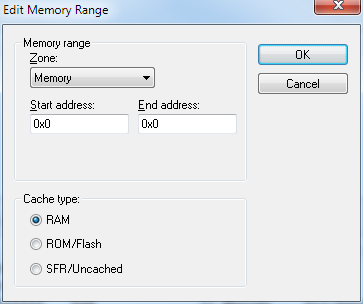
Use this dialog box to specify the memory address ranges, and assign a cache type to each range.
Requirements
The C-SPY E1/E2/E20 driver.
Memory range
Defines the memory address range specific to your device:
- Zone
Selects a memory zone, see C-SPY memory zones.
- Start address
Specify the start address for the memory address range, in hexadecimal notation.
- End address
Specify the end address for the memory address range, in hexadecimal notation.
Cache type
Selects a cache type to the memory address range. Choose between:
- RAM
When the target CPU is not executing, all read accesses from memory are loaded into the cache. For example, if two Memory windows show the same part of memory, the actual memory is only read once from the hardware to update both windows. If you modify memory from a C-SPY window, your data is written to cache only. Before any target execution, even stepping a single machine instruction, the RAM cache is flushed so that all modified bytes are written to the memory on your hardware.
- ROM/Flash
This memory is assumed not to change during a debug session. Any code within such a range that is downloaded when you start a debug session (or technically, any such code that is part of the application being debugged) is stored in the cache and remains there. Other parts of such ranges are loaded into the cache from memory on demand, but are then kept during the debug session. Note that C-SPY will not allow you to modify such memory from C-SPY windows.
Even though flash memory is normally used as a fixed read-only memory, there are applications that modify parts of flash memory at runtime. For example, some part of flash memory might be used for a file system or simply to store non-volatile information. To reflect this in C-SPY, you should choose the RAM cache type for those instead. Then C-SPY will assume that those parts can change at any time during execution.
- SFR/Uncached
A range of this type is completely uncached. All read or write commands from a C-SPY window will access the hardware immediately. Typically, this type is useful for special function registers, which can have all sorts of unusual behavior, such as having different values at every read access. This can in turn have side-effects on other registers when they are written, not containing the same value as was previously written, etc.
If you do not have the appropriate information about your device, you can specify an entire memory as SFR/Uncached. This is not incorrect, but might make C-SPY slower when updating windows. In fact, this caching type is sometimes used by the default when there is no memory address range information available.
If required, you can disable caching—choose Driver>Disable Debugger Cache.
Extra attributes
Provides extra attributes.
- Access width [8,16,32]
Forces C-SPY to use 8, 16, 32-bit width when accessing memory in this range. Specify 8, 16, 32 in the text box.
This option might not be available in the C-SPY driver you are using.