Calculating and verifying a checksum
In this example procedure, a checksum is calculated for ROM memory from 0x8002 up to 0x8FFF and the 2-byte calculated checksum is placed at 0x8000.
If you are using
ielftoolfrom the command line, you must first allocate a memory location for the calculated checksum.Note
If you instead are using the IDE (and not the command line), the
__checksum,__checksum_begin, and__checksum_endsymbols, and the.checksumsection are automatically allocated when you calculate the checksum, which means that you can skip this step.You can allocate the memory location in two ways:
By creating a global C/C++ or assembler constant symbol with a proper size, residing in a specific section—in this example,
.checksumBy using the linker option
‑‑place_holder.For example, to allocate a 2-byte space for the symbol
__checksumin the section.checksum, with alignment 4, specify:‑‑place_holder _ _checksum,2,.checksum,4
The
.checksumsection will only be included in your application if the section appears to be needed. If the checksum is not needed by the application itself, use the linker option‑‑keep=_ _checksum(or the linker directivekeep) to force the section to be included.Alternatively, choose Project>Options>Linker>Input and specify
__checksum: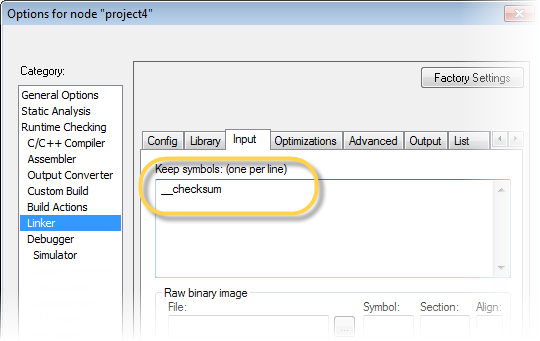
To control the placement of the
.checksumsection, you must modify the linker configuration file. For example, it can look like this (note the handling of the blockCHECKSUM):define block CHECKSUM { ro section .checksum }; place in ROM_region { ro, first block CHECKSUM };Note
It is possible to skip this step, but in that case the
.checksumsection will automatically be placed with other read-only data.When configuring
ielftoolto calculate a checksum, there are some basic choices to make:Checksum algorithm
Choose which checksum algorithm you want to use. In this example, the CRC16 algorithm is used.
Memory range
Using the IDE, you can specify one memory range for which the checksum should be calculated. From the command line, you can specify any ranges.
Fill pattern
Specify a fill pattern—typically
0xFFor0x00—for bytes with unknown values. The fill pattern will be used in all checksum ranges.Specify an alignment that matches the alignment requirement.
For more information, see Briefly about checksum calculation.
Caution
To run
ielftoolfrom the IDE, choose Project>Options>Linker>Checksum and make your settings, for example: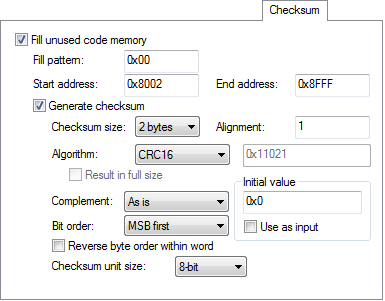
In the simplest case, you can ignore (or leave with default settings) these options: Alignment, Complement, Bit order,Reverse byte order within word, and Checksum unit size.
Danger
To run
ielftoolfrom the command line, specify the command, for example, like this:ielftool ‑‑fill=0x00;0x8002–0x8FFF ‑‑checksum=__checksum:2,crc16;0x8002–0x8FFF sourceFile.out destinationFile.outNote
ielftoolneeds an unstripped input ELF image. If you use the linker option‑‑strip, remove it and use theielftooloption‑‑stripinstead.The checksum will be created later on when you build your project and will be automatically placed in the specified symbol
__checksumin the section.checksum.You can specify several ranges instead of only one range.
Caution
If you are using the IDE, perform these steps:
Choose Project>Options>Linker>Checksum and make sure to deselect Fill unused code memory.
Choose Project>Options>Build Actions and specify the ranges together with the rest of the required commands in the Post-build command line text field, for example like this:
$TOOLKIT_DIR$\bin\ielftool "$TARGET_PATH$" "$TARGET_PATH$"
‑‑fill 0x00;0x0-0x3FF;0x8002-0x8FFF
‑‑checksum=__checksum:2,crc16;0x0-0x3FF;0x8002-0x8FFF
In your example, replace
output.outwith the name of your output file.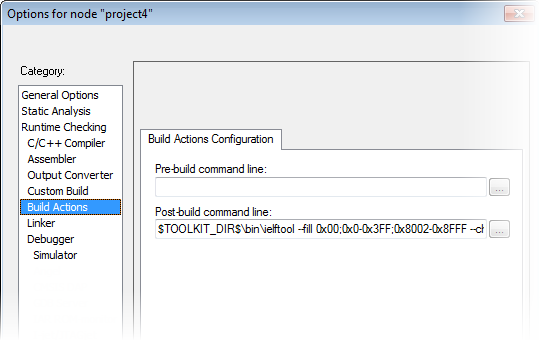
Danger
If you are using the command line, specify the ranges, for example like this:
ielftool
output.outoutput.out‑‑fill 0x00;0x0-0x3FF;0x8002-0x8FFF ‑‑checksum=__checksum:2,crc16;0x0-0x3FF;0x8002-0x8FFFIn your example, replace
output.outwith the name of your output file.Add a function for checksum calculation to your source code. Make sure that the function uses the same algorithm and settings as for the checksum calculated by
ielftool. For example, a variant of the crc16 algorithm with small memory footprint (in contrast to the fast variant that uses more memory):unsigned short SmallCrc16(uint16_t sum, unsigned char *p, unsigned int len) { while (len‑‑) { int i; unsigned char byte = *(p++); for (i = 0; i < 8; ++i) { unsigned long oSum = sum; sum <<= 1; if (byte & 0x80) sum |= 1; if (oSum & 0x8000) sum ^= 0x1021; byte <<= 1; } } return sum; }You can find the source code for this checksum algorithm in the
rh850\src\linkerdirectory of your product installation.Make sure that your application also contains a call to the function that calculates the checksum, compares the two checksums, and takes appropriate action if the checksum values do not match.
This code gives an example of how the checksum can be calculated for your application and to be compared with the
ielftoolgenerated checksum:/* The calculated checksum */ /* Linker generated symbols */ extern unsigned short const __checksum; extern int __checksum_begin; extern int __checksum_end; void TestChecksum() { unsigned short calc = 0; unsigned char zeros[2] = {0, 0}; /* Run the checksum algorithm */ calc = SmallCrc16(0, (unsigned char *) &__checksum_begin, ((unsigned char *) &__checksum_end - ((unsigned char *) &__checksum_begin)+1)); /* Fill the end of the byte sequence with zeros. */ calc = SmallCrc16(calc, zeros, 2); /* Test the checksum */ if (calc != __checksum) { printf("Incorrect checksum!\n"); abort(); /* Failure */ } /* Checksum is correct */ }
Build your application project and download it.
During the build,
ielftoolcreates a checksum and places it in the specified symbol__checksumin the section.checksum.Choose Download and Debug to start the C-SPY Debugger.
During execution, the checksum calculated by
ielftooland the checksum calculated by your application should be identical.If the two checksums prove to be different to each other, there can be several possible causes for that, see Troubleshooting checksum calculation.