Project options
What do you want to do?
Learn about building, see Introduction to building projects
Learn how to: Setting project options using the Options dialog box
Get reference information about the Project tool options, see below the line.

The Project options are available by choosing Tools>Options.
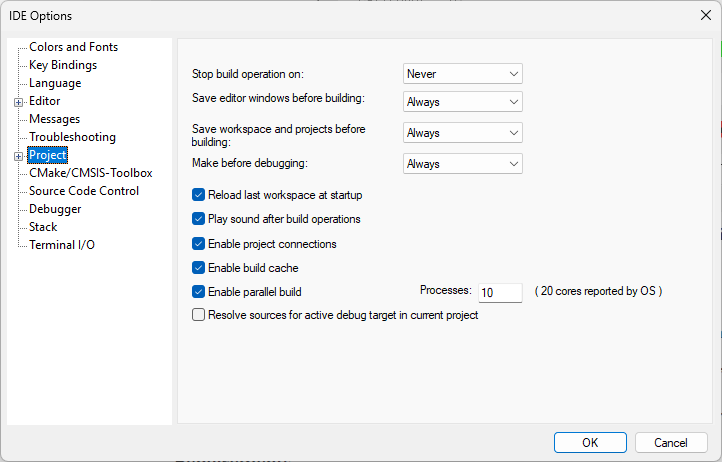
Use this page to set options for the Make and Build commands.
Stop build operation on
Selects when the build operation should stop. Choose between:
- Never
Never stops.
- Errors
Stops on errors.
Save editor windows before building
Selects when the editor windows should be saved before a build operation. Choose between:
- Never
Never saves.
- Ask
Prompts before saving.
- Always
Always saves before Make or Build.
Save workspace and projects before building
Selects when a workspace and included projects should be saved before a build operation. Choose between:
- Never
Never saves.
- Ask
Prompts before saving.
- Always
Always saves before Make or Build.
Make before debugging
Selects when a Make operation should be performed as you start a debug session. Choose between:
- Never
Never performs a Make operation before a debug session.
- Ask
Prompts before performing a Make operation.
- Always
Always performs a Make operation before a debug session.
Reload last workspace at startup
Loads the last active workspace automatically the next time you start the IAR Embedded Workbench IDE.
Enable project connections
Enables the support for setting up live project connections, see Add Project Connection dialog box.
Enable parallel build
Enables the support for parallel build. The compiler runs in several parallel processes to better use the available cores in the CPU. In the Processes text box, specify the number of processes you want to use. Using all available cores might result in a less responsive IDE.
Resolve sources for debug target in current project
Makes the IAR Embedded Workbench IDE try to resolve the source files automatically when an externally built executable is added to a project. This setting is used when you create a new project—existing projects will not be affected by any changes. For more information, see Resolving source files for externally built executable files.