Starting a debug session with source files missing
Normally, when you use the IAR Embedded Workbench IDE to edit source files, build your project, and start the debug session, all required files are available and the process works as expected.
However, if C-SPY cannot automatically find the source files, for example if the application was built on another computer, the Get Alternative File dialog box is displayed:
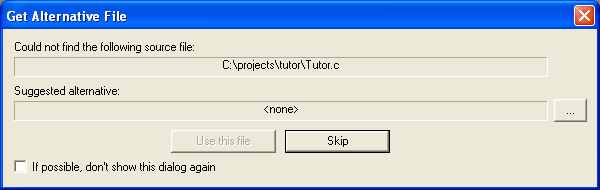
Typically, you can use the dialog box like this:
The source files are not available—Select If possible, don’t show this dialog again and then click Skip. C-SPY will assume that there is no source file available. The dialog box will not appear again, and the debug session will not try to display the source code.
Alternative source files are available at another location—Specify an alternative source code file, select If possible, don’t show this dialog again, and then click Use this file. C-SPY will assume that the alternative file should be used. The dialog box will not appear again, unless a file is needed for which there is no alternative file specified and which cannot be located automatically.
If you restart the IAR Embedded Workbench IDE, the Get Alternative File dialog box will be displayed again once even if you have selected If possible, don’t show this dialog again. This gives you an opportunity to modify your previous settings.
For more information, see Get Alternative File dialog box.