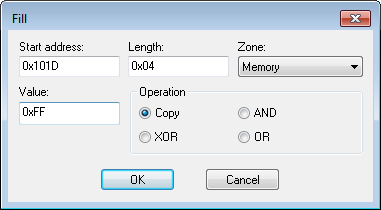
IAR Embedded Workbench for RISC-V 3.40C-SPY DebuggingMemory and registersReference information on memory and registersFill dialog boxFill dialog boxIn this section: What do you want to do?Learn about:Briefly about monitoring memory and registersC-SPY memory zonesGet reference information about the Fill dialog box, see below the line.The Fill dialog box is available from the context menu in the Memory window.Use this dialog box to fill a specified area of memory with a value.RequirementsCan be used with all C-SPY debugger drivers and debug probes.Start addressType the start address—in binary, octal, decimal, or hexadecimal notation.LengthType the length—in binary, octal, decimal, or hexadecimal notation.ZoneSelects a memory zone, see C-SPY memory zones.ValueType the 8-bit value to be used for filling each memory location.OperationThese are the available memory fill operations:CopyValue will be copied to the specified memory area.ANDAn AND operation will be performed between Value and the existing contents of memory before writing the result to memory.XORAn XOR operation will be performed between Value and the existing contents of memory before writing the result to memory.ORAn OR operation will be performed between Value and the existing contents of memory before writing the result to memory.