- IAR Embedded Workbench for RISC-V 3.40
- C-SPY Debugging
- Memory and registers
- Reference information on memory and registers
- Memory Configuration dialog box for C-SPY hardware debugger drivers
Memory Configuration dialog box for C-SPY hardware debugger drivers
What do you want to do?
Learn about:
Get related information:
Get reference information about the Memory Configuration dialog box, see below the line.

The Memory Configuration dialog box is available from the C-SPY driver menu.
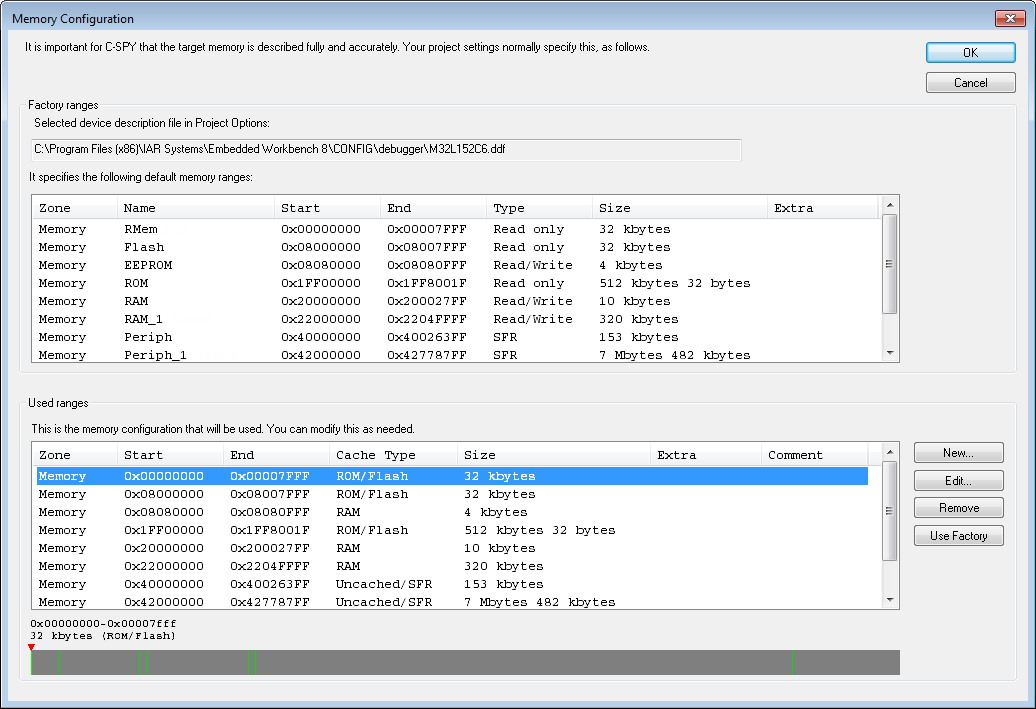
C-SPY uses a default memory configuration based on information retrieved from the device description file in use. If memory configuration is missing in the device description file, C-SPY tries to provide a usable factory default. See Selecting a device description file.
Use this dialog box to verify, and if needed, modify the memory address ranges so that they match the memory available on your device.
You can only change the memory configuration when C-SPY is not running.
Requirements
Any C-SPY hardware debugger driver.
Factory ranges
Identifies which device description file that is currently selected and lists the default memory address ranges retrieved from the file in these columns:
- Zone
The memory zone, see C-SPY memory zones.
- Name
The name of the memory address range.
- Start
The start address for the memory address range, in hexadecimal notation.
- End
The end address for the memory address range, in hexadecimal notation.
- Type
The access type of the memory address range.
- Size
The size of the memory address range.
Used ranges
These columns list the memory address ranges that will be used by C-SPY. The columns are normally identical to the factory ranges, unless you have added, removed, or modified ranges.
- Zone
Selects a memory zone, see C-SPY memory zones.
- Start
The start address for the memory address range, in hexadecimal notation.
- End
The end address for the memory address range, in hexadecimal notation.
- Cache Type
The cache type of the memory address range.
- Size
The size of the memory address range.
- Comment
Memory area information.
Use the buttons to override the default memory address ranges that are retrieved from the device description file.
Graphical bar
A graphical bar that visualizes the entire theoretical memory address range for the device. Defined ranges are highlighted in green.
Buttons
These buttons are available for manual ranges:
- New
Opens the Edit Memory Range dialog box, where you can specify a new memory address range and associate a cache type with it, see Edit Memory Range dialog box for C-SPY hardware debugger drivers.
- Edit
Opens the Edit Memory Range dialog box, where you can edit the selected memory address area. See Edit Memory Range dialog box for C-SPY hardware debugger drivers.
- Remove
Removes the selected memory address range definition.
- Use Factory
Restores the list of used ranges to the factory ranges.