Setup
What do you want to do?
Learn how to:
Get reference information about the Setup page; see below the line.

By default, C-SPY downloads the application to RAM or flash when a debug session starts. The Download options let you modify the behavior of the download.
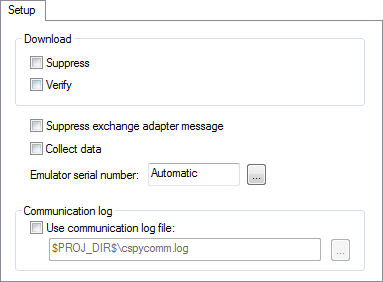
Download
Sets options for the code image to debug.
Disables the downloading of code, while preserving the present content of the flash. This command is useful if you want to debug an application that already resides in target memory. If this option is combined with the Verify option, the debugger will read back the code image from non-volatile memory and verify that it is identical to the built application. | |
Verifies that the downloaded code image can be read back from target memory with the correct contents. |
Suppress exchange adapter message
This option is not used.
Collect data
Enables data collection for devices that support Smart Analog data collection and display. If this option has been selected, the only debug commands that can be used in the C-SPY Debugger are Go, Break, and Stop Debugging. The collected data is displayed in the Timeline, Event Log, and Event Log Summary windows.
This option only exists for the E1, E2, E20, and E2 Lite/E2 On-Board emulators.
Emulator serial number
Selects which Renesas emulator to use, if more than one is connected to your host computer via USB. This option only exists for the E1, E2, E20, E2 Lite/E2 On-Board, and EZCube2 emulators.
Log communication
Logs the communication between C-SPY and the target system to a file. To interpret the result, detailed knowledge of the interface is required.