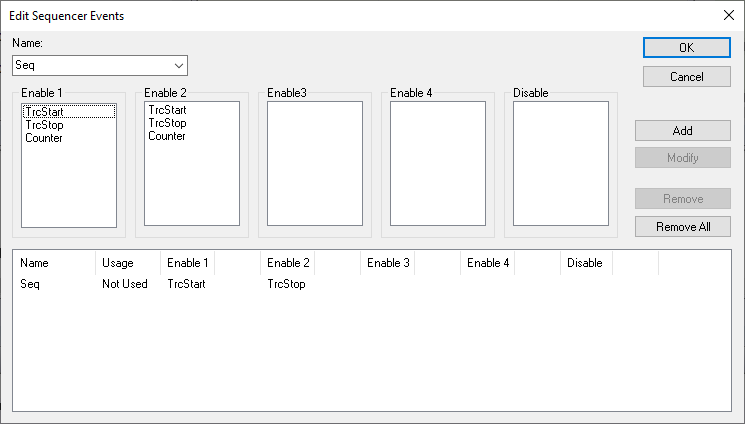
The Edit Sequencer Events dialog box is available from the Emulator menu.
Use this dialog box to set a sequence of events that must occur before a sequencer event is triggered.
Requirements
Any supported hardware debugger system, but requires a device that supports events.
Name
To define a new event, enter the event name in the Name list box and choose the appropriate characteristics. Click Add.
To modify an existing event, choose the event from the Name list box, enter the new characteristics and click on one of the Modify, Remove, or RemoveAll buttons.
Enable/Disable
Select up to four Enable events that must be triggered in a sequence to create a sequencer event. You can only select one event in each Enable list. You do not have to use all Enable lists.
If the Disable event occurs, the sequence starts over with the first Enable event again.
Display area
This area displays all created events and their settings. The Usage column shows how the event is used—as a breakpoint, a trace, a timer, or a sequencer event.
Buttons
These buttons are available:
Add
Adds the selected event in the Name list box.
Modify
Modifies the selected event in the Name list box using the current settings in the dialog box.
Remove
Removes the selected event from the Name list box.