Optimizations
The Optimizations options determine the type and level of optimization for the generation of object code.
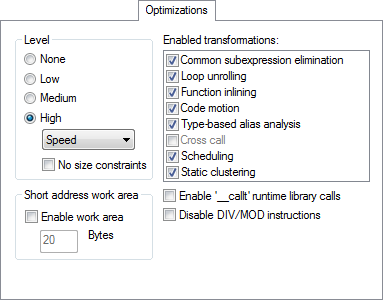
Level
Selects the optimization level. Choose between:
- High
The highest level of optimization. Choose from:
Balanced, the highest level of optimization, balancing between speed and size.
Size, the highest level of optimization, favoring size.
Speed, the highest level of optimization, favoring speed.
By default, a debug project will have a size optimization that is fully debuggable, while a release project will have a high balanced optimization that generates small code without sacrificing speed.
For a list of optimizations performed at each optimization level, see Optimization levels.
Enabled transformations
Selects which transformations that are available at different optimization levels. When a transformation is available, you can enable or disable it by selecting its check box. Choose between:
Common subexpression elimination
Loop unrolling
Function inlining
Code motion
Type-based alias analysis
Static clustering
Instruction scheduling
Cross call (subroutine abstraction)
Note
In a debug project the transformations are, by default, disabled. In a release project the transformations are, by default, enabled.
For a brief description of the transformations that can be individually disabled, see Fine-tuning enabled transformations.
Short address work area
Sets the size of the space reserved in the saddr memory area for the .wrkseg section, used as the register variable work area.
The most frequently used parameters and auto variables are stored in this area, up to the size that you specify. Only the number of bytes actually used by each function will be allocated. The maximum size is 128 bytes.
There is an overhead in saving and restoring the work area at each function entry and exit, unless the modifier __no_save is used with the function.