Library Configuration
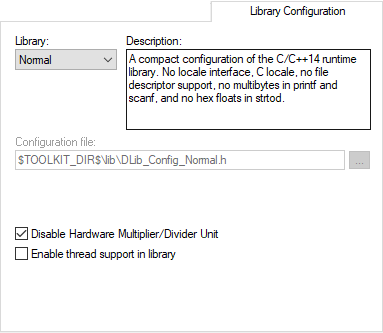
The Library Configuration options determine which library to use.
For information about the runtime library, library configurations, the runtime environment they provide, and the possible customizations, see The DLIB runtime environment.
Library
Selects which runtime library to use. For information about available libraries, see Prebuilt runtime libraries.
The names of the library object file and library configuration file that actually will be used are displayed in the Library file and Configuration file text boxes, respectively.
Configuration file
Displays the library configuration file that will be used. A library configuration file is chosen automatically depending on the project settings. If you have chosen Custom in the Library drop-down list, you must specify your own library configuration file.
Disable Hardware Multiplier/Divider Unit
Excludes runtime support for RL78 devices with a hardware multiplier/divider unit. If the currently selected device does not have a hardware multiplier/divider unit, this option is not available.
Enable thread support in library
Select this option to automatically configure the runtime library for use with threads.