Download
By default, C-SPY downloads the application to RAM or flash when a debug session starts. The Download options let you modify the behavior of the download.
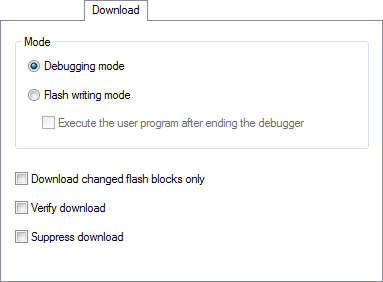
Debugging mode
Makes the emulator operate as a debugger. After downloading your application, you cannot disconnect the debugger and use the target system as a stand-alone unit. In this mode, you cannot write ID Codes (that protect the memory from being accessed) to the flash memory.
Flash writing mode
Makes the emulator operate as a flash memory programmer. You cannot use the emulator as a debugger in this mode. After downloading your application, an ID Code (that protects the memory from being accessed) is written to the flash memory.
Execute the user program after ending the debugger
Launches your application on the target board when the code has been downloaded.
Download changed flash blocks only
Downloads just the flash memory blocks that have been changed since the last download. This makes downloading faster. This option is only available for the E1/E20 and E2/E2 Lite/EZ-CUBE2 C-SPY drivers.
Verify download
Verifies that the downloaded code image can be read back from target memory with the correct contents.
Suppress download
Disables the downloading of code, while preserving the present content of the flash memory. This command is useful if you want to debug an application that already resides in target memory.
If this option is combined with the Verify download option, the debugger will read back the code image from non-volatile memory and verify that it is identical to the debugged application.