- IAR Embedded Workbench for RX 5.20
- C-SPY Debugging
- Memory and registers
- Reference information on memory and registers
- Memory Configuration dialog box for the C-SPY simulator
Memory Configuration dialog box for the C-SPY simulator
What do you want to do?
Learn about:
Get related information:
Get reference information about the Memory Configuration dialog box, see below the line.

The Memory Configuration dialog box is available from the C-SPY driver menu.
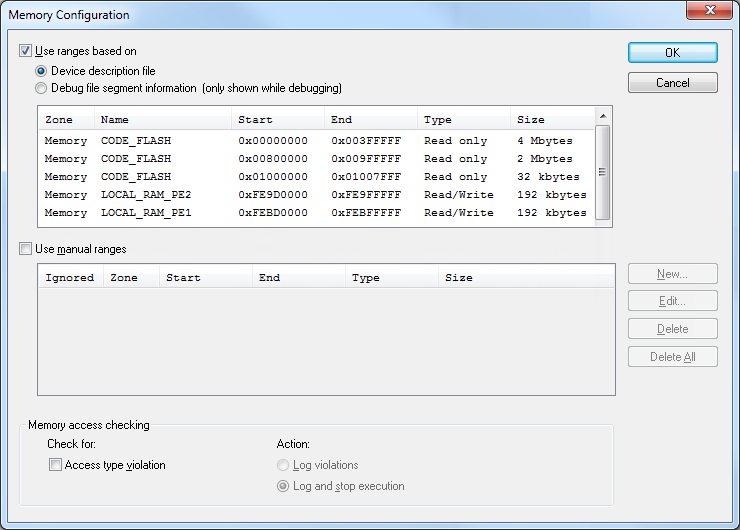
Use this dialog box to specify which set of memory address ranges to be used by C-SPY during debugging.
Requirements
The C-SPY simulator.
Use ranges based on
Specify if the memory configuration should be retrieved from a predefined configuration. Choose between:
- Device description file
Retrieves the memory configuration from the device description file that you have specified. See Selecting a device description file.
This option is used by default.
- Debug file segment information
Retrieves the memory configuration from the debug file, which has retrieved it from the linker configuration file. This information is only available during a debug session. The advantage of using this option is that the simulator can catch memory accesses outside the linked application.
Memory information is displayed in these columns:
- Zone
The memory zone, see C-SPY memory zones.
- Name
The name of the memory address range.
- Start
The start address for the memory address range, in hexadecimal notation.
- End
The end address for the memory address range, in hexadecimal notation.
- Type
The access type of the memory address range.
- Size
The size of the memory address range.
Use manual ranges
Specify your own ranges manually via the Edit Memory Range dialog box. To open this dialog box, click New to specify a new memory address range, or select an existing memory address range and click Edit to modify it. For more information, see Edit Memory Range dialog box for the C-SPY simulator.
The ranges you define manually are saved between debug sessions.
An X in the column Ignored means that C-SPY has detected that the specified manual range is illegal, for example because it overlaps another range. C-SPY will not use such an area.
Memory access checking
Check for determines what to check for:
Access type violation.
Action selects the action to be performed if an access violation occurs. Choose between:
Log violations
Log and stop execution.
Any violations are logged in the Debug Log window.
Buttons
These buttons are available for the manual ranges:
- New
Opens the Edit Memory Range dialog box, where you can specify a new memory address range and associate an access type with it, see Edit Memory Range dialog box for the C-SPY simulator.
- Edit
Opens the Edit Memory Range dialog box, where you can edit the selected memory address range. See Edit Memory Range dialog box for the C-SPY simulator.
- Delete
Deletes the selected memory address range definition.
- Delete All
Deletes all defined memory address range definitions.