Replace dialog box
What do you want to do?
Learn how to: Text searching
Get reference information about the Replace dialog box, see below the line.

The Replace dialog box is available from the Edit menu.
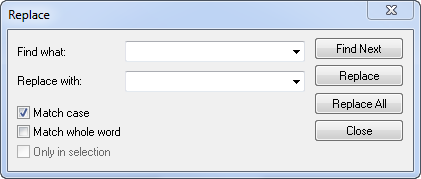
Note that the contents of the dialog box are different if you search in an editor window compared to if you search in the Memory window.
Find what
Specify the text to search for. Use the drop-down list to use old search strings.
Replace with
Specify the text to replace each found occurrence with. Use the drop-down list to use old search strings.
Match case
Searches only for occurrences that exactly match the case of the specified text. Otherwise, specifying int will also find INT and Int. This option is only available when you perform the search in an editor window.
Match whole word
Searches for the specified text only if it occurs as a separate word. Otherwise, specifying int will also find print, sprintf etc. This option is only available when you perform the search in an editor window.
Search as hex
Searches for the specified hexadecimal value. This option is only available when you perform the search in the Memory window.
Only in selection
Limits the search operation to the selected lines (when searching in an editor window) or to the selected memory area (when searching in the Memory window). The option is only enabled when a selection has been made before you open the dialog box.
Find Next
Searches for the next occurrence of the specified text.
Replace
Replaces the searched text with the specified text.
Replace all
Replaces all occurrences of the searched text in the current editor window.