Library Options 1
The options on the Library Options 1 page select the printf and scanf formatters.
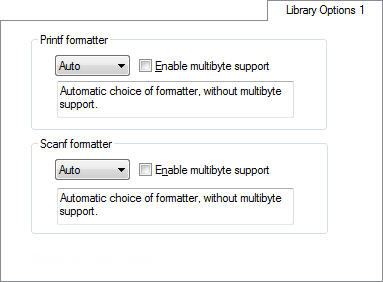
For information about the capabilities of the formatters, see Formatters for printf and Formatters for scanf.
Printf formatter
If you select Auto, the linker automatically chooses the appropriate formatter for printf-related functions based on information from the compiler.
To override the default formatter for all printf-related functions, except for wprintf variants, choose between:
Printf formatters in the IAR DLIB Library—Full, Large, Small, and Tiny
Choose a formatter that suits the requirements of your application.
Select Enable multibyte support to make the printf formatter support multibytes.
Scanf formatter
If you select Auto, the linker automatically chooses the appropriate formatter for scanf-related functions based on information from the compiler.
To override the default formatter for all scanf-related functions, except for wscanf variants, choose between:
Scanf formatters in the IAR DLIB Library—Full, Large, and Small
Choose a formatter that suits the requirements of your application.
Select Enable multibyte support to make the scanf formatter support multibytes.