Library
The Library options select the set of used libraries.
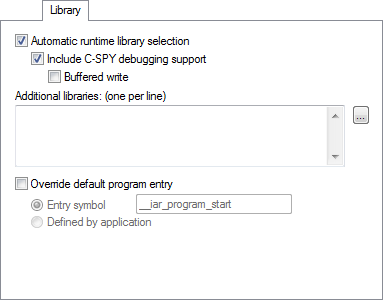
For more information about available libraries, see Prebuilt runtime libraries.
Automatic runtime library selection
Makes the linker automatically choose the appropriate library based on your project settings.
Include C-SPY debugging support
Includes a debug library for communication between the application you debug and the debugger itself.
Buffered write
Buffers terminal output during program execution, instead of instantly printing each new character to the C-SPY Terminal I/O window. This option is useful when you use debugger systems that have slow communication.
Additional libraries
Specify additional libraries that you want the linker to include during the link process. You can only specify one library per line and you must specify the full path to the library.
Use the browse button to display the Edit Additional Libraries dialog box, where you can specify libraries using a file browser. For more information, see Edit Additional Libraries dialog box.
The argument variables $PROJ_DIR$ and $TOOLKIT_DIR$ can be used, see Argument variables.
Alternatively, you can add an additional library directly to your project in the Workspace window. You can find an example of this in the tutorial for creating and using libraries.
Override default program entry
By default, the program entry is the label __iar_program_start. The linker makes sure that a module containing the program entry label is included, and that the section containing that label is not discarded.
Override default program entry overrides the default entry label. Choose between:
- Entry symbol
Specify an entry symbol other than default.
- No entry symbol
No entry symbol will be defined and the entry point of the application image will be
0. For this reason, the application must contain a symbol or section that has therootattribute and that refers, directly or indirectly, to the rest of the application, otherwise the image will be empty.