View menu
The View menu provides several commands for opening windows in the IDE. When C-SPY is running you can also open debugger-specific windows from this menu. See the C-SPY Debugging documentation for information about these.
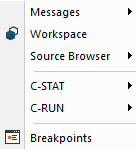
Menu commands
These commands are available:
- Messages
Displays a submenu which gives access to the message windows—Build, Find in Files, Source Browse Log, Tool Output, Debug Log—that display messages and text output from the IAR Embedded Workbench commands. If the window you choose from the menu is already open, it becomes the active window.
- Workspace

Opens the current Workspace window, see Workspace window.
- Source Browser>Outline

Opens the Outline window, see Outline window.
- Source Browser>References

Opens the References window, see References window.
- Source Browser>Declarations

Opens the Declarations window, see Declarations window.
- Source Browser>Ambiguous Definitions

Opens the Ambiguous Definitions window, see Ambiguous Definitions window.
- Source Browser>Call Graph

Opens the Call Graph window, see Call Graph window.
- C-STAT>C-STAT Messages

Opens the C-STAT Messages window, see the C-STAT® Static Analysis Guide.
- C-RUN>Messages
Opens the C-RUN Messages window, see C-RUN Messages window.
- C-RUN>Messages Rules
Opens the C-RUN Messages Rules window, see C-RUN Messages Rules window.
- Breakpoints

Opens the Breakpoints window, see Breakpoints window.
- Call Stack

Opens the Call Stack window. Only available when C-SPY is running.
- Watch

Opens an instance of the Watch window from a submenu. Only available when C-SPY is running.
- Live Watch

Opens the Live Watch window. Only available when C-SPY is running.
- Quick Watch

Opens the Quick Watch window. Only available when C-SPY is running.
- Auto
Opens the Auto window. Only available when C-SPY is running.
- Locals
Opens the Locals window. Only available when C-SPY is running.
- Statics

Opens the Statics window. Only available when C-SPY is running.
- Memory

Opens an instance of the Memory window from a submenu. Only available when C-SPY is running.
- Registers
Displays a submenu which gives access to the Registers windows—Registers and Register User Groups Setup. Only available when C-SPY is running.
- Disassembly

Opens the Disassembly window. Only available when C-SPY is running.
- Stack

Opens an instance of the Stack window from a submenu. Only available when C-SPY is running.
- Symbolic Memory

Opens the Symbolic Memory window. Only available when C-SPY is running.
- Terminal I/O

Opens the Terminal I/O window. Only available when C-SPY is running.
- Macros>Macro Quicklaunch

Opens the Macro Quicklaunch window. Only available when C-SPY is running.
- Macros>Macro Registration

Opens the Macro Registration window. Only available when C-SPY is running.
- Macros>Debugger Macros

Opens the Debugger Macros window. Only available when C-SPY is running.
- Symbols

Opens the Symbols window. Only available when C-SPY is running.
- Code Coverage

Opens the Code Coverage window. Only available when C-SPY is running.
- Images

Opens the Images window. Only available when C-SPY is running.
- Cores

Opens the Cores window. Only available when C-SPY is running.