GDB Server menu
When you are using the C-SPY GDB Server driver, the GDB Server menu is added to the menu bar.
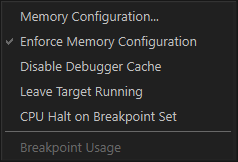
Menu commands
These commands are available on the menu:
- Memory Configuration
Displays a dialog box, see Memory Configuration dialog box for C-SPY hardware debugger drivers.
- Enforce Memory Configuration
Prevents the driver from accessing any memory ranges in the zone
Memorythat have not been defined in the Memory Configuration dialog box.
- Disable Debugger Cache
Disables memory caching and memory range checking in C-SPY.
Normally, C-SPY uses the memory range information in the Memory Configuration dialog box both to restrict access to certain parts of target memory and to cache target memory contents for improved C-SPY performance. Under certain rare circumstances, this is not appropriate, and you can choose Disable Debugger Cache to turn off the caching and memory range checking completely. All accesses from C-SPY will then result in corresponding accesses to the target system. Some of those circumstances are:
When memory is remapped at runtime and cannot be specified as a fixed set of ranges.
When the memory range setup is incorrect or incomplete.
- Leave Target Running
Leaves the application running on the target hardware after the debug session is closed.
Because existing breakpoints might not be automatically removed, consider disabling all breakpoints before using this menu command.
- CPU Halt on Breakpoint Set
Makes it possible to set a breakpoint in an executing application on hardware that does not support setting breakpoints while running. Setting a breakpoint halts the core, sets the breakpoint, and starts the core again.
- Breakpoint Usage
Opens a window which lists all active breakpoints, see Breakpoint Usage window.