View menu
The View menu provides several commands for opening windows in the IDE. When C-SPY is running you can also open debugger-specific windows from this menu. See the C-SPY Debugging documentation for information about these.
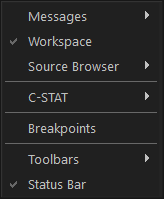
Menu commands
These commands are available:
- Messages
Displays a submenu which gives access to the message windows that display messages and text output from the IAR Embedded Workbench commands. If the window you choose from the menu is already open, it becomes the active window.
- Workspace
Opens the current Workspace window, see Workspace window.
- Source Browser>Outline
Opens the Outline window, see Outline window.
- C-STAT>C-STAT Messages
Opens the C-STAT Messages window, see the C-STAT® Static Analysis Guide.
- C-RUN>Messages
Opens the C-RUN Messages window, see C-RUN Messages window.
- C-RUN>Messages Rules
Opens the C-RUN Messages Rules window, see C-RUN Messages Rules window.
- Breakpoints
Opens the Breakpoints window, see Breakpoints window.
- Toolbars
The options on this submenu toggle the toolbars on or off. There might be toolbars that are only available for certain C-SPY debug drivers, and only during a debug session.
- Status bar
Toggles the status bar on and off.