CMake options
The CMake page contains options for using IAR Embedded Workbench with CMake. The page is available by choosing Project>Options>CMake.
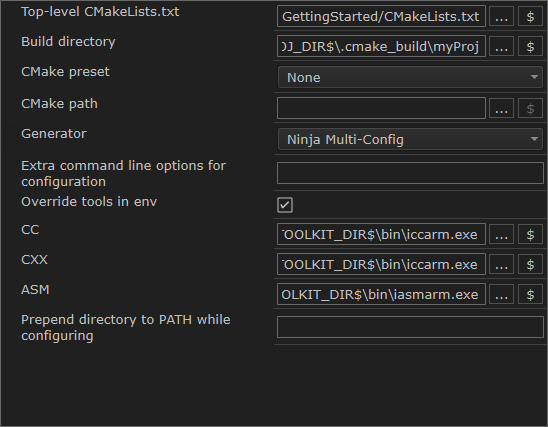
Top-level CMAKELists.txt
Specify the path to the top-level CMakeLists.txt file, that is, the one located in the source directory. This file is processed first. If this field is left empty, the location of the build directory must be specified.
Build directory
Specify the location of the CMake build folder.
CMake preset
Choose a CMake configure preset for the project. The presets are imported from the project's CMakePresets.json/CMakeUserPresets.json file.
CMake path
This is the path to the CMake executable file. Change this path to use another CMake installation.
Generator
Sets the build generator. Choose between:
Ninja
Ninja Multi-Config
Extra command line options for configuration
Use this field to send command line build options directly to CMake.
Override tools in env
Specify the locations of the C compiler (CC), C++ compiler (CXX), and assembler (ASM) that CMake will use during the build process.
Prepend directory to PATH while configuring
Specify a path to prepend to the PATH environment variables during the configuration of the project. For example, entering the installation path to an older project version makes CMake use that compiler instead of the current one.