I-jet — Interface
The Interface options specify the interface between I-jet or I-jet Trace and the target system.
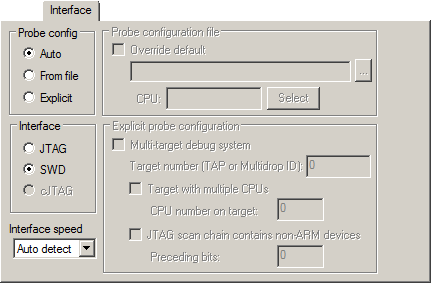
Interface
Selects the communication interface between the debug probe and the target system. Choose between:
- JTAG
Uses the JTAG interface.
- SWD
Uses the SWO interface, which uses fewer pins than JTAG. Select SWD if you want to use the serial-wire output (SWO) communication channel. Note that if you select stdout/stderr via SWO on the General Options>Library Configuration page, SWD is selected automatically. For more information about SWO settings, see SWO Trace Window Settings dialog box.
- cJTAG
Uses the cJTAG interface.
Interface speed
Specifies the JTAG and SWD communication speed. Choose between:
- Auto detect
Automatically uses the highest possible frequency for reliable operation.
- Adaptive
Synchronizes the clock to the processor clock outside the core. Works only with Arm devices that have the
RTCKJTAG signal available.
Explicit probe configuration
- Target number (TAP or Multidrop ID)
If the debug system is a multi-drop SWD, specify the Multidrop ID (in hexadecimal notation) of the DAP where your CPU is located.
If the debug system is a JTAG scan chain, specify the Target number TAP (Test Access Port) position of the device you want to connect to. The TAP numbers start from zero and are counted from the TDO end (TAP number
0is the one connected to the TDO line). If there are several CPUs at the TAP position, you also need to specify the CPU number on target.