- IAR Embedded Workbench for Arm 9.70.x
- C-SPY Debugging
- Trace
- Reference information on trace
- SWO Trace Window Settings dialog box
SWO Trace Window Settings dialog box
The SWO Trace Window Settings dialog box is available from the C-SPY driver menu, alternatively from the SWO Trace window toolbar.
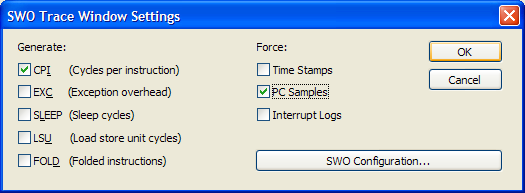
Use this dialog box to specify what to display in the SWO Trace window.
Note that you also need to configure the generation of trace data, click SWO Configuration. For more information, see SWO Configuration dialog box.
Requirements
One of these alternatives:
The C-SPY I-jet driver and an I-jet or I-jet Trace in-circuit debugging probe
The C-SPY J-Link/J-Trace driver and a J-Link/J-Trace JTAG/SWD probe
The C-SPY ST-LINK driver and an ST-LINK JTAG/SWD probe
The C-SPY TI XDS driver and a TI XDS probe
Force
Enables data generation, if it is not already enabled by other features using SWO trace data. The Trace window displays all generated SWO data. Other features in C-SPY, for example Profiling, can also enable SWO trace data generation. If no other feature has enabled the generation, use the Force options to generate SWO trace data.
The generated data will be displayed in the Trace window. Choose between:
- Time Stamps
Enables timestamps for various SWO trace packets, that is sent over the SWO communication channel. Use the resolution drop-down list to choose the resolution of the timestamp value. For example, 1 to count every cycle, or 16 to count every 16th cycle. Note that the lowest resolution is only useful if the time between each event packet is long enough. 16 is useful if using a low SWO clock frequency.
This option does not apply to I-jet.
- PC samples
Enables sampling the program counter register, PC, at regular intervals. To choose the sampling rate, see SWO Configuration dialog box, specifically the option PC Sampling.
- Interrupt Logs
Forces the generation of interrupt logs to the SWO Trace window. For information about other C-SPY features that also use trace data for interrupts, see Interrupts.
- ITM Log
Forces the generation of ITM logs to the SWO Trace window.
This option only applies to I-jet.
Generate
Enables trace data generation for these events. The generated data will be displayed in the Trace window. The value of the counters are displayed in the Comment column in the SWO Trace window. Choose between:
- CPI
Enables generation of trace data for the CPI counter.
- EXC
Enables generation of trace data for the EXC counter.
- SLEEP
Enables generation of trace data for the SLEEP counter.
- LSU
Enables generation of trace data for the LSU counter.
- FOLD
Enables generation of trace data for the FOLD counter.
SWO Configuration
Displays the SWO Configuration dialog box where you can configure the hardware’s generation of trace data. See SWO Configuration dialog box.
This button is not available when you are using I-jet.