TI Stellaris — Setup
The Setup options specify the TI Stellaris interface.
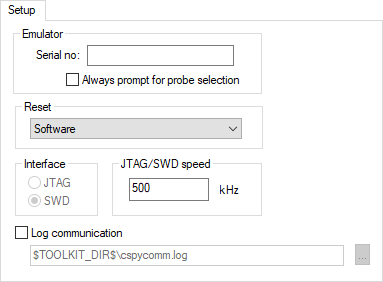
Emulator
These options are used for identifying the debug probe to use.
- Always prompt for probe selection
Makes C-SPY always ask you to confirm which probe to use, if more than one debug probe is connected to the host computer.
- Serial no
Enter the serial number of the debug probe you are using.
Reset
Selects the reset strategy to be used when the debugger starts. Based on your hardware, one of the strategies is the default. Choose between:
- Software (core) (0)
Resets the core. Sets
PCto the program entry address andSPto the initial stack pointer value.
- System (1)
Resets the core and peripheral units. Sets
PCto the program entry address andSPto the initial stack pointer value.
Interface
Selects the communication interface between the TI Stellaris debug probe and the target system. Choose between:
- JTAG (default)
Uses the JTAG interface.
- SWD
Uses fewer pins than JTAG. Select SWD if you want to use the serial-wire output (SWO) communication channel. Note that if you select stdout/stderr via SWO on the General Options>Library Configuration page, SWD is selected automatically. For more information about SWO settings, see SWO Trace Window Settings dialog box.
JTAG/SWD speed
Specify the JTAG communication speed in kHz.
Log communication
Logs the communication between C-SPY and the target system to a file. To interpret the result, detailed knowledge of the interface is required.