TI XDS — Communication
The Communication options control the TI XDS interface.
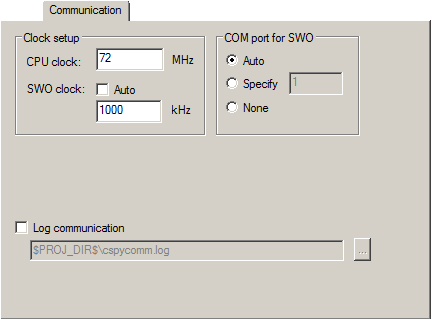
Clock setup
Specifies the CPU clock. Choose between:
- CPU clock
Specifies the exact clock frequency used by the internal processor clock,
HCLK, in MHz. The value can have decimals. This value is used for configuring the SWO communication speed and for calculating timestamps.
- SWO clock
Specifies the clock frequency of the SWO communication channel in KHz.
- Auto
Automatically uses the highest possible frequency that the debug probe can handle. If Auto is not selected, the wanted SWO clock value can be input in the text box. The value can have decimals. Use this option if data packets are lost during transmission.
To override the Clock setup options, use the Override project default option in the SWO Configuration dialog box, see SWO Configuration dialog box.
COM port for SWO
Specifies the COM port to use for the SWO communication. Choose between:
- Auto
The debugger automatically identifies the COM port that is associated with the debug probe.
- Specify
Specify the number of the COM port, 1-256.
- None
The debugger leaves the COM port unused and SWO trace is disabled.
Log communication
Logs the communication between C-SPY and the target system to a file. To interpret the result, detailed knowledge of the interface is required.