Stack window
What do you want to do?
Learn about:
Learn how to:
Setting tool options for the Stack window, see the IDE documentation
Get reference information about the Stack window, see below the line.

The Stack window is available from the View menu.
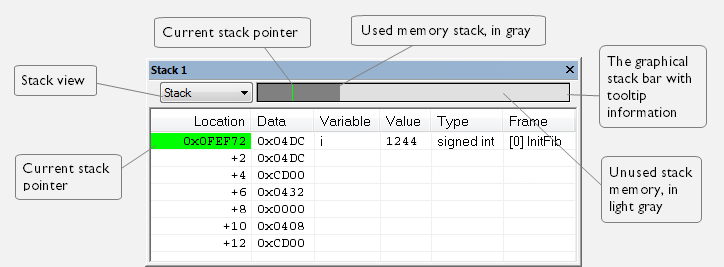
This window is a memory window that displays the contents of the stack. The graphical stack bar shows stack usage.
This window retrieves information about the stack size and placement from the definition in the linker configuration file of the sections holding the stacks. For descriptions of the sections, see Section reference. For applications that set up the stacks using other mechanisms, you can to override the default mechanism. Use one of the C-SPY command line option variants, see ‑‑proc_stack_stack.
Note
By default, this window uses one physical breakpoint. For more information, see Breakpoint consumers.
Context menu
This context menu is available:
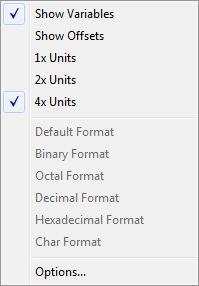
These commands are available:
- 1x Units
Displays the memory contents as single bytes.
- 2x Units
Displays the memory contents as 2-byte groups.
- 4x Units
Displays the memory contents as 4-byte groups.
- Default Format, Binary Format, Octal Format, Decimal Format, Hexadecimal Format, Char Format
Changes the display format of expressions. The display format setting affects different types of expressions in different ways. Your selection of display format is saved between debug sessions. These commands are available if a selected line in the window contains a variable.
The display format setting affects different types of expressions in these ways:
Variables
The display setting affects only the selected variable, not other variables.
Array elements
The display setting affects the complete array, that is, the same display format is used for each array element.
Structure fields
All elements with the same definition—the same field name and C declaration type—are affected by the display setting.
- Options
Opens the IDE Options dialog box where you can set options specific to the Stack window, see Stack options.