Registers window
What do you want to do?
Learn about:
Learn how to:
Get reference information about the Registers windows, see below the line.

The Registers windows are available from the View menu.
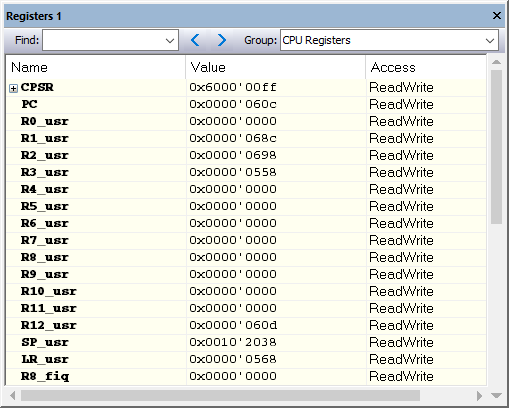
These windows give an up-to-date display of the contents of the processor registers and special function registers, and allow you to edit the contents of some of the registers. Optionally, you can choose to load either predefined register groups or your own user-defined groups.
You can open up to four instances of this window, which is convenient for keeping track of different register groups.
Select a device description file that suits your device, see Selecting a device description file. These files contain predefined register groups.
Display the registers of a register group by selecting it from the Group drop-down menu on the toolbar, or by right-clicking in the window and choosing View Group from the context menu.
For information about creating your own user-defined register groups, see Defining application-specific register groups.
Context menu
This context menu is available:
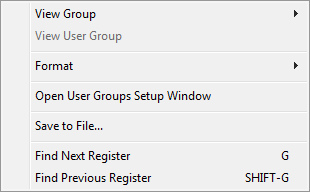
These commands are available:
- View Group
Selects which predefined register group to display.
- View User Group
Selects which user-defined register group to display. For information about creating your own user-defined register groups, see Defining application-specific register groups.
- Format
Changes the display format for the contents of the register you clicked on. The display format setting affects different types of registers in different ways. Your selection of display format is saved between debug sessions.
- Open User Groups Setup Window
Opens a window where you can create your own user-defined register groups, see Register User Groups Setup window.
- Save to File
Opens a standard Save dialog box to save the contents of the window to a tab-separated text file.
- Find Next Register
Finds the predefined register or register group that comes immediately after what your search found. After the last register was found, this search wraps around and finds the first register again.
- Find Previous Register
Finds the matching predefined register or register group that comes immediately before what your search found. After the first register was found, this search wraps around and finds the last register again.