Introduction to the runtime environment
A runtime environment is the environment in which your application executes.
Runtime environment functionality
The DLIB runtime environment supports Standard C and C++ and consists of:
The C/C++ standard library, both its interface (provided in the system header files) and its implementation.
Startup and exit code.
Low-level I/O interface for managing input and output (I/O).
Special compiler support, for instance functions for switch handling or integer arithmetics.
Support for hardware features:
Direct access to low-level processor operations by means of intrinsic functions, such as functions for interrupt mask handling
Peripheral unit registers and interrupt definitions in include files
Target-specific support for a floating-point coprocessor with single or double precision.
Runtime environment functions are provided in one or more runtime libraries.
The runtime library is delivered both as prebuilt libraries and (depending on your product package) as source files. The prebuilt libraries are available in different configurations to meet various needs, see Runtime library configurations. You can find the libraries in the product subdirectories rh850\lib and rh850\src\lib, respectively.
For more information about the library, see the chapter C/C++ standard library functions.
Briefly about input and output (I/O)
Every application must communicate with its environment. The application might for example display information on an LCD, read a value from a sensor, get the current date from the operating system, etc. Typically, your application performs I/O via the C/C++ standard library or some third-party library.
There are many functions in the C/C++ standard library that deal with I/O, including functions for standard character streams, file system access, time and date, miscellaneous system actions, and termination and assert. This set of functions is referred to as the standard I/O interface.
On a desktop computer or a server, the operating system is expected to provide I/O functionality to the application via the standard I/O interface in the runtime environment. However, in an embedded system, the runtime library cannot assume that such functionality is present, or even that there is an operating system at all. Therefore, the low-level part of the standard I/O interface is not completely implemented by default:
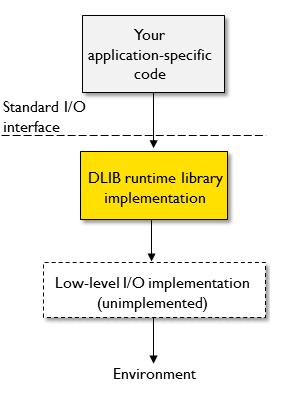
To make the standard I/O interface work, you can:
Let the C-SPY debugger emulate I/O operations on the host computer, see Briefly about C-SPY emulated I/O
Retarget the standard I/O interface to your target system by providing a suitable implementation of the interface, see Briefly about retargeting.
It is possible to mix these two approaches. You can, for example, let debug printouts and asserts be emulated by the C-SPY debugger, but implement your own file system. The debug printouts and asserts are useful during debugging, but no longer needed when running the application stand-alone (not connected to the C-SPY debugger).
Briefly about C-SPY emulated I/O
C-SPY emulated I/O is a mechanism which lets the runtime environment interact with the C-SPY debugger to emulate I/O actions on the host computer:
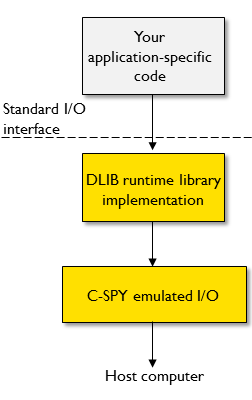
For example, when C-SPY emulated I/O is enabled:
Standard character streams are directed to the C-SPY Terminal I/O window
File system operations are performed on the host computer
Time and date functions return the time and date of the host computer
The C-SPY debugger notifies when the application terminates or an assert fails.
This behavior can be valuable during the early development of an application, for example in an application that uses file I/O before any flash file system I/O drivers are implemented, or if you need to debug constructions in your application that use stdin and stdout without the actual hardware device for input and output being available.
See Setting up your runtime environment and The C-SPY emulated I/O mechanism.
Briefly about retargeting
Retargeting is the process where you adapt the runtime environment so that your application can execute I/O operations on your target system.
The standard I/O interface is large and complex. To make retargeting easier, the DLIB runtime environment is designed so that it performs all I/O operations through a small set of simple functions, which is referred to as the DLIB low-level I/O interface. By default, the functions in the low-level interface lack usable implementations. Some are unimplemented, others have stub implementations that do not perform anything except returning error codes.
To retarget the standard I/O interface, all you have to do is to provide implementations for the functions in the DLIB low-level I/O interface.
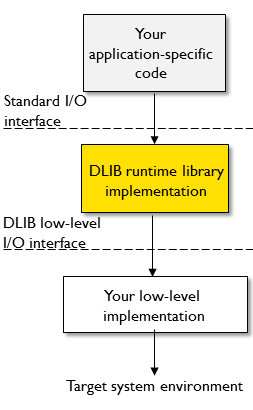
For example, if your application calls the functions printf and fputc in the standard I/O interface, the implementations of those functions both call the low-level function __write to output individual characters. To make them work, you just need to provide an implementation of the __write function—either by implementing it yourself, or by using a third-party implementation.
For information about how to override library modules with your own implementations, see Overriding library modules. See also The DLIB low-level I/O interface for information about the functions that are part of the interface.