Get reference information about the Event breakpoints dialog box; see below the line.

The Event breakpoints dialog box is available from the context menu in the Breakpoints window.
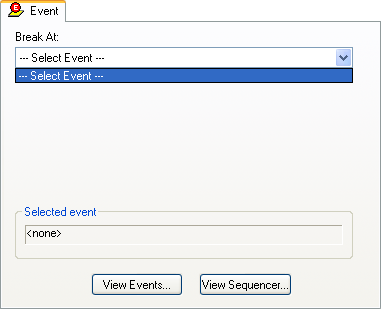
Use the Event breakpoints dialog box to specify an event as a breakpoint condition. You can make these event breakpoints either code or data breakpoints.
Requirements
Can be used with any supported hardware debugger system.
Break At
Select an event from the Break At list to use it as a condition for the breakpoint.
The list contains all events defined in the Edit Events or Edit Sequencer dialog boxes. The access type is identified by a bracketed tag:
Displays the current event to be used as a condition for the breakpoint.
View Events
Displays the Edit Events dialog box in view-only mode, to let you inspect an event. To define or modify an event, open this dialog box from the Emulator menu. See Edit Events dialog box.
View Sequencer
Displays the Edit Sequencer Events dialog box in view-only mode, to let you inspect an event. To define or modify an event, open this dialog box from the Emulator menu. See Edit Sequencer Events dialog box.