CMake menu
The CMake menu provides commands for working with CMake projects. It is available when the active project is a CMake project.
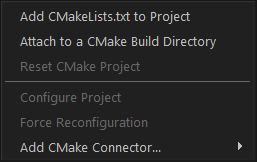
Menu commands
These commands are available:
- Add CMakeLists.txt to Project
Opens a standard Windows Open dialog box, where you can browse for a
CMakeLists.txtfile to add to the Embedded Workbench project. Adding it can take a few minutes.Note
This removes any files that are already part of the project.
- Attach to a CMake Build Directory
Opens a dialog box where you can locate a CMake build directory and attach it to the active Embedded Workbench project.
- Reset CMake Project
Disconnects the CMake build directory or the
CMakeLists.txtfile, depending on how the project was configured. This allows you to connect the Embedded Workbench project to a different CMake project.- Configure Project
Synchronizes all build files with the CMake project files. This is done automatically when you open a project and when you build.
- Force Reconfiguration
Deletes all build files generated by CMake and reruns CMake to regenerate them.
- Add CMake Connector>CSolution
Opens a standard Windows Open dialog box, where you can browse for a CMSIS-Toolbox
csolution.ymlproject file to add to the Embedded Workbench project. Adding it can take a few minutes.Note
This removes any files that are already part of the project.