I-jet : Breakpoints
The Breakpoints options specify the breakpoint behavior for I-jet.
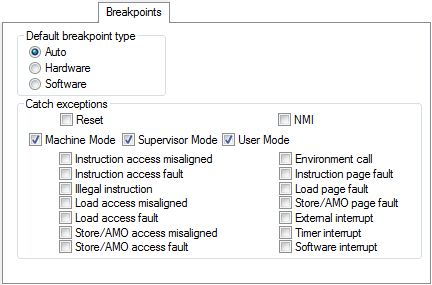
Default breakpoint type
Selects the type of breakpoint resource to be used when setting a breakpoint. Choose between:
Auto | Uses a software breakpoint. If this is not possible, a hardware breakpoint will be used. The debugger will use read/write sequences to test for RAM—in that case, a software breakpoint will be used. |
Hardware | Uses hardware breakpoints. If it is not possible, no breakpoint will be set. |
Software | Uses software breakpoints. If it is not possible, no breakpoint will be set. |
Catch exceptions
Sets a breakpoint directly on a vector in the interrupt vector table, without using a hardware breakpoint. The settings you make will work as default settings for the project and are preserved during debug sessions.
Reset | Catches reset exceptions. |
NMI | Catches non-maskable interrupts. |
Select which of the exceptions or interrupts listed in the lower half of the group box to catch, and in which execution modes (Machine Mode, Supervisor Mode, and/or User Mode) they will be caught. If you do not select at least one execution mode, none of the exceptions listed below the mode options will be caught, even if they are selected. By default, all three mode options are selected.
Note
Not all exceptions are supported by all devices. Refer to the manufacturer’s device manual to confirm which exceptions your device supports.