I-jet : Interface
The Interface options specify the interface between I-jet and the target system.
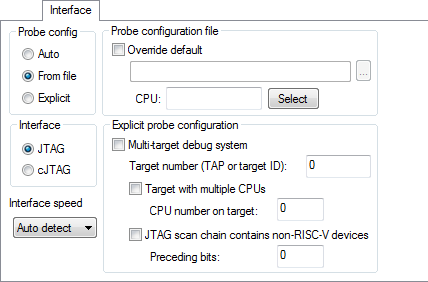
Probe config
- Auto
The I-jet driver automatically identifies the target CPU. It uses the default probe configuration file, if there is one.
This works best if there is only one CPU present.
- From file
Specifies that the probe configuration file needs to be overridden, or that there are several target CPUs.
- Explicit
Specify how to find the target CPU.
Interface
Selects the communication interface between the debug probe and the target system. Choose between:
- JTAG
Uses the JTAG interface.
- cJTAG
Uses the cJTAG interface.
Interface speed
Specify the JTAG communication speed. Choose between:
- Auto detect
Automatically uses the highest possible frequency for reliable operation.
Probe configuration file
- Override default
Specify a probe configuration file to be used instead of the default probe configuration file that comes with the product package.
- CPU
Specify the target CPU.
Explicit probe configuration
- Multi-target debug system
Select this option to enable the other options in this section. This might be needed if the automatic probe configuration does not work, regardless of the number of cores in the target system and the number of TAPs on the JTAG chain.
- Target number (TAP or target ID)
If the debug system is a JTAG scan chain, specify the Target number TAP (Test Access Port) position of the device you want to connect to. The TAP numbers start from zero. If there are several cores at the TAP position, you also need to specify the CPU number on target.
- Target with multiple CPUs
If you have multiple cores or harts (hardware threads) on the selected TAP, you can select this option to specify which one you want to debug.
- CPU number on target
Specify the index number of the core/hart on selected TAP. Hart numbers start from 0.
- JTAG scan chain contains non-RISC-V devices
Enables JTAG scan chains that mix RISC-V devices with other devices.
- Preceding bits
Specify the TAP (Test Access Port) position of the device you want to connect to. The TAP numbers start from zero.