Tools menu
The Tools menu provides commands for customizing the environment, such as changing common fonts and shortcut keys.
It is a user-configurable menu to which you can add tools for use with IAR Embedded Workbench. Therefore, it might look different depending on which tools you have preconfigured to appear as menu items.
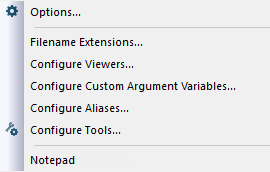
Menu Commands
These commands are available:
- Options

Displays the IDE Options dialog box where you can customize the IDE. See:
- Filename Extensions
Displays the Filename Extensions dialog box where you can define the filename extensions to be accepted by the build tools, see Filename Extensions dialog box.
- Configure Viewers
Displays the Configure Viewers dialog box where you can configure viewer applications to open documents with, see Configure Viewers dialog box.
- Configure Custom Argument Variables
Displays the Configure Custom Argument Variables dialog box where you can define and edit your own custom argument variables, see Configure Custom Argument Variables dialog box.
- Configure Aliases
Displays the Configure Aliases dialog box where you can supply aliases to the IDE, so that files that are unavailable to the IDE can be located and displayed in the Workspace window when an externally built binary file is added to a project, see Configure Aliases dialog box.
- Configure Tools

Displays the Configure Tools dialog box where you can set up the interface to use external tools, see Configure Tools dialog box.
- Notepad
User-configured. This is an example of a user-configured addition to the Tools menu.