C-SPY Debugger main window
What do you want to do?
Learn about:
Learn how to:
Get reference information about the C-SPY Debugger main window, see below the line.

When you start a debug session, these debugger-specific items appear in the main IAR Embedded Workbench IDE window:
A dedicated Debug menu with commands for executing and debugging your application
Depending on the C-SPY driver you are using, a driver-specific menu, often referred to as the Driver menu in this documentation. Typically, this menu contains menu commands for opening driver-specific windows and dialog boxes.
A special debug toolbar
A special multicore debugging toolbar
Several windows and dialog boxes specific to C-SPY
The C-SPY main window might look different depending on which components of the product installation you are using.
Disassembly menu
The Disassembly menu is available when C-SPY is running. This menu provides commands for controlling how the disassembler operates.
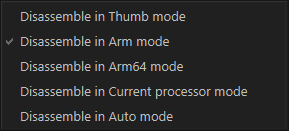
Use the commands on the menu to select which disassembly mode to use.
These commands are available:
Disassemble in Thumb mode | Disassembles your application in Thumb mode. |
Disassemble in Arm mode | Disassembles your application in Arm mode. |
Disassemble in Arm64 mode | Disassembles your application in 64-bit mode. |
Disassemble in Current processor mode | Disassembles your application in the current processor mode. |
Disassemble in Auto mode | Disassembles your application in automatic mode. This is the default option. |
See also Disassembly window.