TI Stellaris menu
When you are using the C-SPY TI Stellaris driver, the TI Stellaris menu is added to the menu bar.
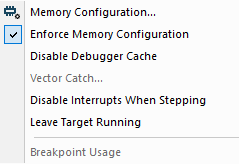
Menu commands
These commands are available on the menu:
- Memory Configuration
Displays a dialog box, see Memory Configuration dialog box for C-SPY hardware debugger drivers.
- Disable Debugger Cache
Disables memory caching and memory range checking in C-SPY.
Normally, C-SPY uses the memory range information in the Memory Configuration dialog box both to restrict access to certain parts of target memory and to cache target memory contents for improved C-SPY performance. Under certain rare circumstances, this is not appropriate, and you can choose Disable Debugger Cache to turn off the caching and memory range checking completely. All accesses from C-SPY will then result in corresponding accesses to the target system. Some of those circumstances are:
When memory is remapped at runtime and cannot be specified as a fixed set of ranges.
When the memory range setup is incorrect or incomplete.
- Vector Catch
Opens a dialog box for setting a breakpoint directly on a vector in the interrupt vector table, see Vector Catch dialog box. Note that this command is not available for all Arm cores.
- Disable Interrupts When Stepping
Ensures that only the stepped statements will be executed. Interrupts will not be executed. This command can be used when not running at full speed and some interrupts interfere with the debugging process.
- Breakpoint Usage
Opens a window which lists all active breakpoints, see Breakpoint Usage window.